
Table of Contents
What is Email Reconnaissance?
Email reconnaissance involves collecting, analyzing, and validating information related to email addresses, email domains, mail servers, and email infrastructure. Security professionals use this process to verify the authenticity, ownership, and security posture of email communications.
Cybersecurity teams rely on email reconnaissance in OSINT (Open-Source Intelligence) investigations, threat intelligence research, digital forensics, phishing investigations, and threat hunting. Security analysts, penetration testers, and researchers use email reconnaissance techniques to trace email origins, investigate suspicious senders, analyze email headers, identify phishing attacks, detect spam campaigns, verify email authentication records, and discover publicly exposed corporate email addresses.
Investigators examine email metadata, SMTP routing paths, SPF, DKIM, and DMARC records, DNS configurations, WHOIS data, and domain reputation information to uncover valuable insights about the source and legitimacy of an email. Furthermore, these findings help organizations identify potential threats, validate email authenticity, and strengthen their overall email security posture. In addition, investigators can use this information to detect suspicious infrastructure and support threat intelligence activities. Moreover, a detailed analysis of these indicators enables security teams to identify hidden risks and respond to potential threats more effectively.
Email remains one of the most common attack vectors used by cybercriminals. Therefore, organizations must continuously improve their ability to identify and investigate email-based threats. For this reason, security teams should regularly perform email reconnaissance and email security assessments.
Consequently, security professionals can identify malicious activity at an earlier stage and reduce the likelihood of successful attacks. As a result, organizations can better defend their networks, protect sensitive information, and minimize the risk of email-based cyber threats.
Common Objectives of Email Reconnaissance Include
- Identifying mail servers.
- Tracking email spoofing attempts.
- Investigating business email compromise (BEC) attacks.
- Performing domain intelligence gathering.
- Supporting incident response operations.
Discovering Public Email Addresses – theHarvester
theHarvester is a powerful open-source OSINT (Open-Source Intelligence) and reconnaissance tool that helps cybersecurity professionals gather publicly available information about a target domain. Penetration testers, digital forensic investigators, threat intelligence analysts, bug bounty hunters, and security researchers regularly use theHarvester during security assessments and investigations.
The tool automatically collects email addresses, subdomains, employee information, hostnames, DNS records, virtual hosts, and other valuable intelligence from multiple public sources. As a result, investigators can build a comprehensive profile of an organization’s online presence and identify potential security risks. Furthermore, theHarvester helps security teams uncover exposed assets and improve attack surface visibility.
In addition, organizations use theHarvester during email reconnaissance, domain intelligence gathering, phishing assessments, and cybersecurity investigations. By collecting information from multiple OSINT sources, the tool enables investigators to discover exposed corporate email addresses, map external infrastructure, and identify potential attack vectors. Consequently, security teams can perform more effective threat intelligence research and strengthen their overall cybersecurity posture.
Furthermore, theHarvester plays a critical role in discovering exposed corporate email addresses, identifying potential attack surfaces, mapping external infrastructure, and supporting security assessments. By gathering publicly available information from multiple sources, the tool enables investigators to uncover valuable intelligence and strengthen their reconnaissance efforts. Consequently, cybersecurity professionals can perform more effective threat intelligence research, phishing investigations, and digital forensic analyses.
theHarvester Usage
- theHarvester is available with Kali Linux OS. Start theHavester.
- Type theHarvester
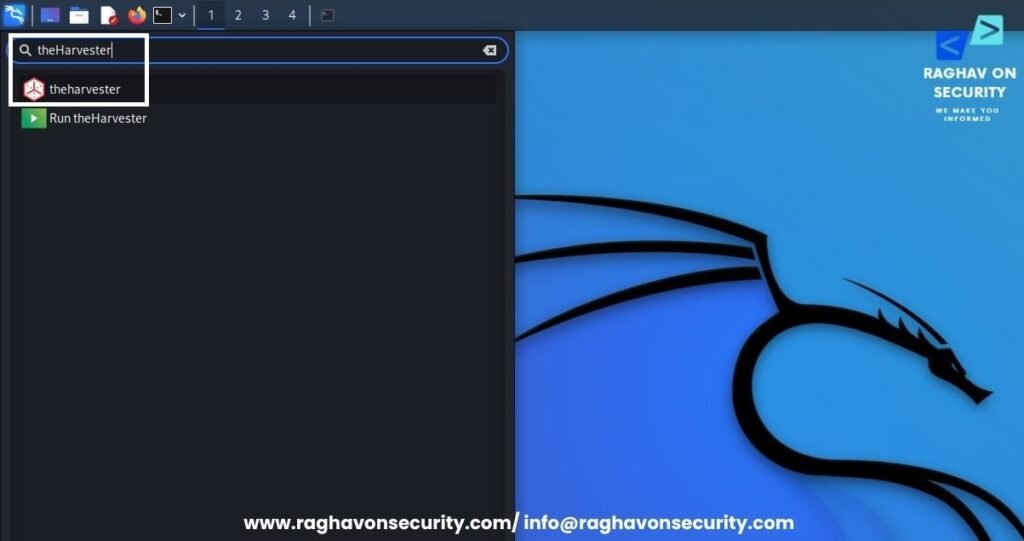
- Type theHarvester -d fbi.gov -1 2øø -b bing,duckduckgo,crtsh,dnsdumpster,yahoo
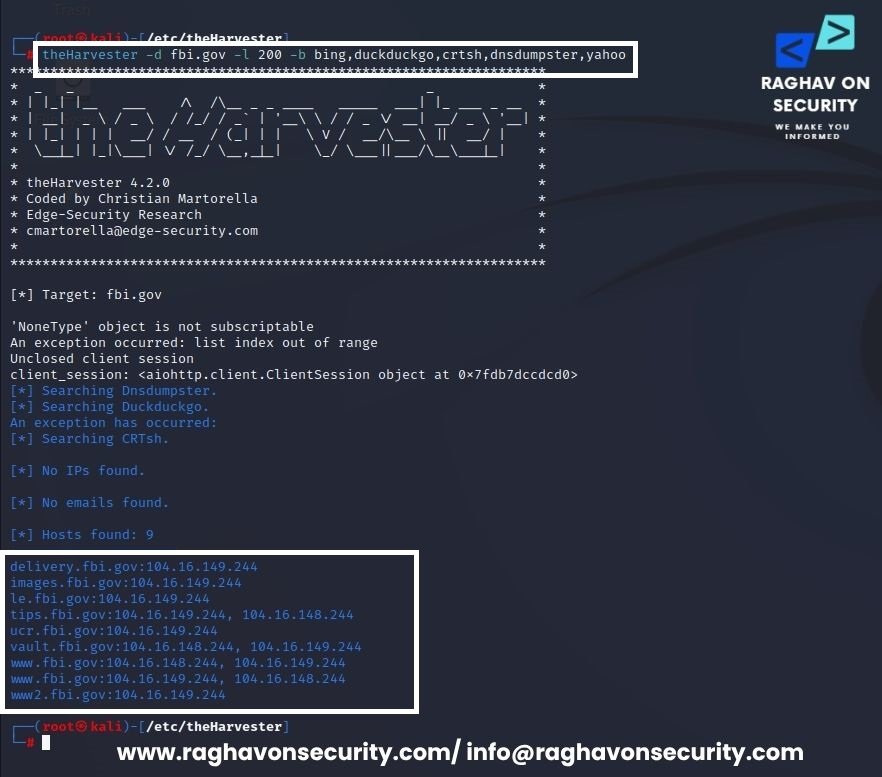
- After querying the above target. We can see the listed email addresses. These email addresses were gathered from the open database.
Understanding Email Headers
Email headers play a critical role in email reconnaissance, email forensics, phishing investigations, spam analysis, and cybersecurity threat intelligence. Every email contains a hidden set of metadata known as an email header. This metadata provides valuable information about the sender, recipient, email servers, routing path, authentication mechanisms, timestamps, and message delivery process.
As a result, security analysts, SOC teams, incident responders, OSINT investigators, and digital forensics professionals regularly analyze email headers during cybersecurity investigations. Furthermore, they use email header analysis to trace email origins, identify phishing attacks, detect email spoofing attempts, investigate Business Email Compromise (BEC) incidents, and validate sender authenticity. In addition, investigators leverage email headers to uncover malicious email campaigns, analyze suspicious infrastructure, and gather actionable threat intelligence. Consequently, organizations can improve email security, strengthen threat detection capabilities, and respond more effectively to email-based cyber threats.
By examining email headers, investigators can identify the originating IP address, mail transfer agents (MTAs), SPF, DKIM, and DMARC authentication results, encryption protocols, attachment details, and other technical indicators that help determine whether an email is legitimate or potentially malicious.
Common Email Header Fields Explained (Part 1)
| Header Field | Example | Description |
| X-Mailer | X-Mailer: Mail Client | Identifies the email client or application used to send the message, such as Outlook, Thunderbird, Apple Mail, or a webmail service. |
| From | From: Sender Name sender@domain.com | Specifies the sender’s displayed email address. This field can be spoofed and should not be trusted without additional verification. |
| To | To: Recipient Name recipient@domain.com | Displays the intended recipient of the email. |
| Subject | Subject: Important Notification | Contains the subject line of the email message. |
| X-Originating-IP | X-Originating-IP: 192.168.1.1 | Indicates the IP address from which the email was originally generated or submitted. Useful for email tracing and source attribution. |
| TLS / SSL Information | version=TLSv1.3 cipher=TLS_AES_256_GCM_SHA384 | Shows the encryption protocol used during email transmission to secure communications between mail servers. |
| DKIM Signature | DKIM-Signature: v=1; a=rsa-sha256; | DomainKeys Identified Mail (DKIM) verifies that the message was authorized and signed by the sending domain. |
| MIME-Version | MIME-Version: 1.0 | Specifies that the message follows Multipurpose Internet Mail Extensions (MIME) standards for handling text, HTML, and attachments. |
| SPF Authentication | Authentication-Results: spf=pass | Sender Policy Framework (SPF) validates whether the sending mail server is authorized to send emails on behalf of the domain. |
| SPF Results | spf=pass, spf=neutral, spf=fail | Pass indicates an authorized sender, Neutral indicates no explicit policy, and Fail suggests the server is not permitted to send email for the domain. |
Common Email Header Fields Explained (Part 2)
| Header Field | Example | Description |
| Boundary | boundary=”20cf3074d1fe465ddb04cf2e3ce7″ | Defines the separation between different MIME content sections such as text, HTML, and attachments. |
| Content-Type | Content-Type: text/plain; charset=UTF-8 | Specifies the type and format of content contained within the email body. |
| X-Gm-Message-State | X-Gm-Message-State: random_string | A Gmail-specific header used internally by Google for message processing and delivery status tracking. |
| Content-Transfer-Encoding | Content-Transfer-Encoding: base64 | Indicates how the message body has been encoded for safe transmission across mail servers. |
| HTML Content | Content-Type: text/html | Shows that the email body contains HTML formatting, links, images, or styled content. |
| Attachment Information | Content-Disposition: attachment | Indicates that one or more files are attached to the email. |
| Filename | filename=”invoice.pdf” | Displays the name and extension of the attached file. |
| Attachment Encoding | Content-Transfer-Encoding: base64 | Specifies the encoding method used to transmit the attachment safel |
| X-Attachment-Id | X-Attachment-Id: unique_random_string | A unique identifier assigned to an attachment for tracking and processing purposes. |
Why Email Headers Analysis Matters?
Email header analysis plays a vital role in cybersecurity investigations, phishing detection, malware analysis, email tracing, digital forensics, threat hunting, and incident response.
By understanding how to interpret email headers, security professionals can verify sender authenticity and identify spoofed emails. Furthermore, they can investigate malicious email campaigns, detect phishing attempts, and analyze email routing paths more effectively. In addition, email header analysis helps investigators gather actionable threat intelligence and uncover suspicious email infrastructure. As a result, organizations can strengthen their email security posture, improve threat detection capabilities, and better protect themselves against email-based cyber threats.
Where to find the Original Email Header?
- Gmail Email Header – Open Gmail account – click on any email – tap on overflow menu – click on “Show Original”.
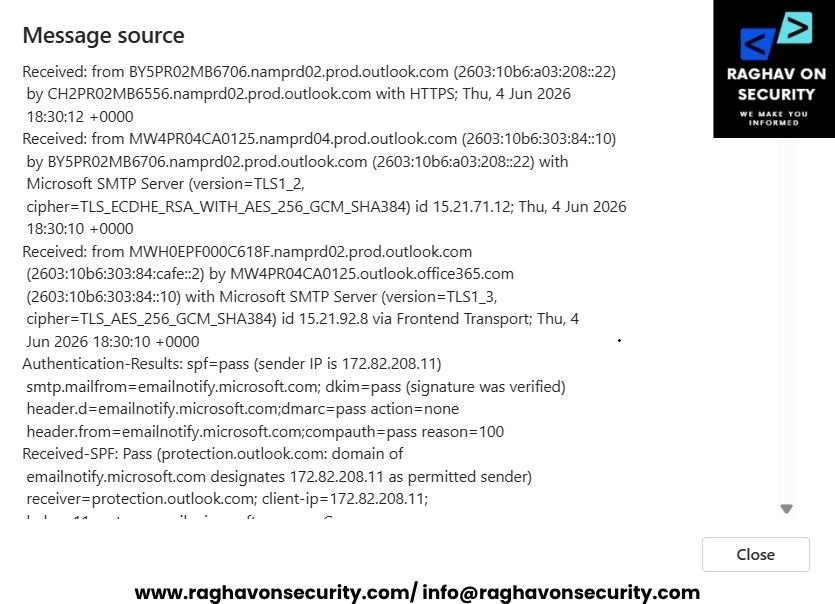
- Outlook Email Header – Open Outlook account – click on any email – tap on ellipsis menu – click on view, then on “Message Source”.
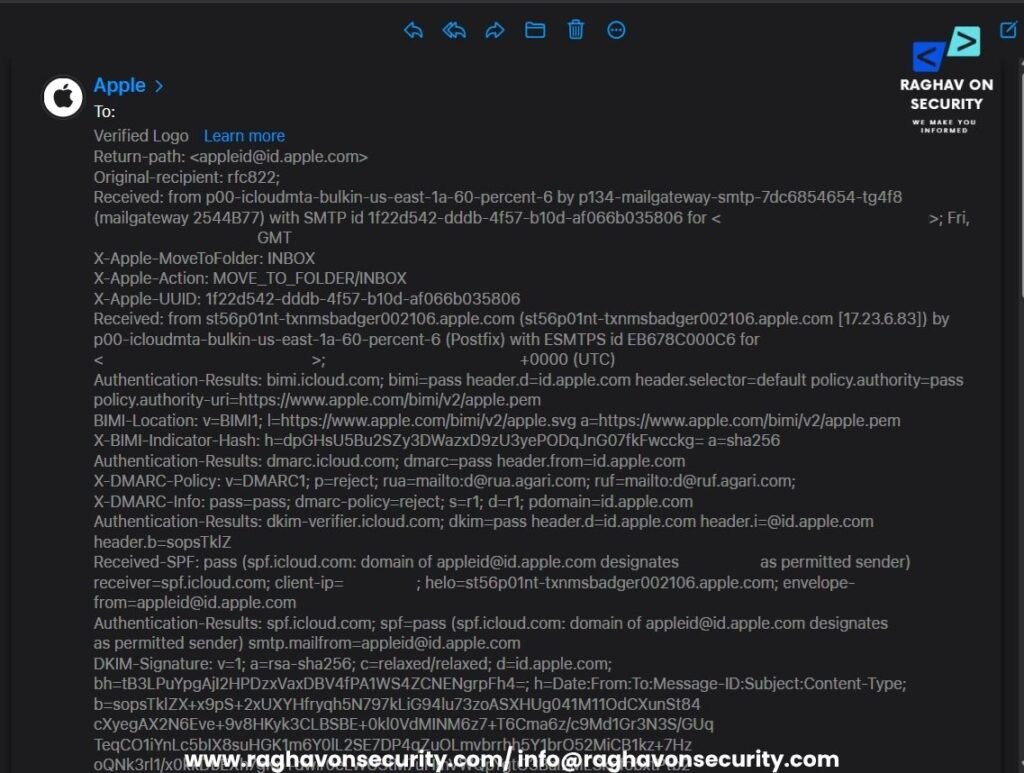
- iCloud Email Header – Open the iCloud account – click on any email – tap on ellipsis menu – click on “Show All Headers.”
How to Analyse the Email Header?
- When viewing an email, most mail clients display only basic information such as the From, To, Subject, and Date fields. However, every email contains a detailed header that stores valuable technical information about the email’s journey from sender to recipient.
- Email headers include critical authentication mechanisms such as SPF (Sender Policy Framework), DKIM (DomainKeys Identified Mail), and DMARC (Domain-based Message Authentication, Reporting, and Conformance). These email security protocols help verify the authenticity of the sender and protect against email spoofing, phishing attacks, and business email compromise (BEC) scams.
- SPF, DKIM, or DMARC checks may fail due to configuration issues, domain misconfigurations, or malicious activities. Such failures can negatively impact email deliverability, cause messages to be marked as spam, or indicate potential security threats.
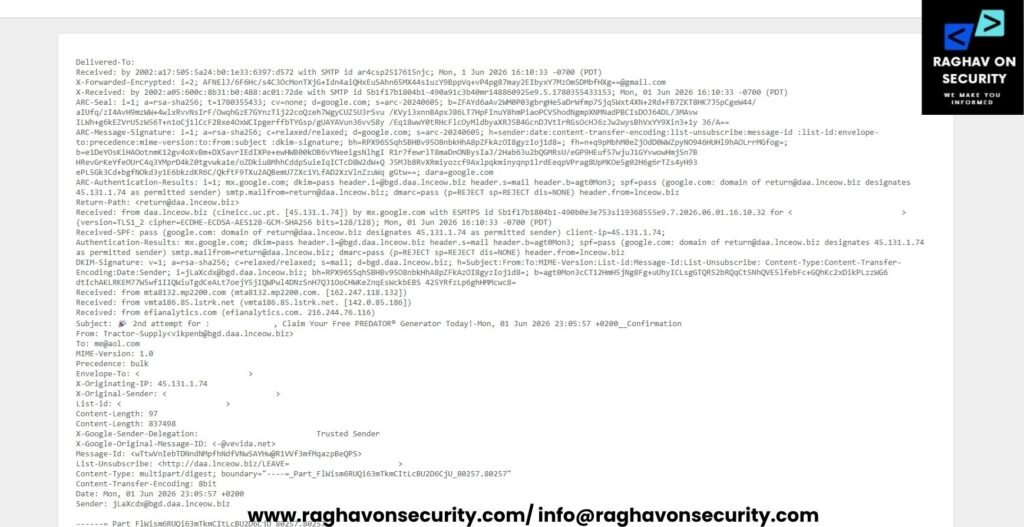
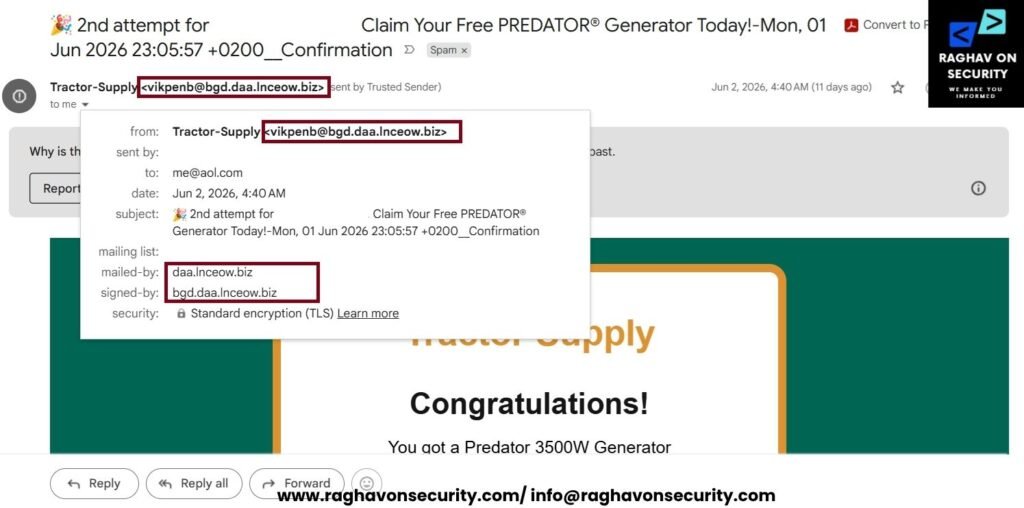
- For demonstrating, we will explain the Gmail email header. The email landed in the spam folder.
Actual Email
Email Header (Show Original)
Delivered-To: example@gmail.com
Received: by 2002:a17:505:5a24:b0:1e33:6397:d572 with SMTP id ar4csp2517615njc; Mon, 1 Jun 2026 16:10:33 -0700 (PDT)
X-Forwarded-Encrypted: i=2;
AFNElJ/6F6Hc/s4C3OcMonTXjG+Idn4aiQHxEuSAhn65MX44s1uzY9BppVq+vP4pg87may2EIbyxY7MzOm5DMbfHXg==@gmail.com
X-Received: by 2002:a05:600c:8b31:b0:488:ac01:72de with SMTP id 5b1f17b1804b1-490a91c3b40mr148860925e9.5.1780355433153; Mon, 01 Jun 2026 16:10:33 -0700 (PDT)
ARC-Seal: i=1; a=rsa-sha256; t=1780355433; cv=none; d=google.com; s=arc-20240605;
b=ZFAYd6aAv2WM0P03gbrgHe5aDrWfmp7Sjq5Wxt4XN+2Rd+FB7ZKT8HK7J5pCgeW44/ aIUfq/zI4AvH9mzWW+4wlxRvvNsIrF/OwqhGzE7GYnzTij22coQzeh7WgyCUZ5U3rSvu /KVyi3xnnBApxJ86LT7HpFInuY8hmPiaoPCVShodNgmpXNMNadPBCIsDOJ64DL/3MAvw ILWh+g6kEZVrU5zW56T+n1oCj1lCcF2Bxe4OxWCIpgerffbTYGsp/gUAYAVun36vvS8y /Eq18wwY0tRHcFlcOyMldbyaXRJ5B4GcnDJVtIrRGsOcHJ6zJw2wysBhVxYY9Xin3+1y 36/A==
ARC-Message-Signature: i=1; a=rsa-sha256; c=relaxed/relaxed; d=google.com; s=arc-20240605; h=sender:date:content-transfer-encoding:list-unsubscribe:message-id :list-id:envelope-to:precedence:mime-version:to:from:subject :dkim-signature; bh=RPX96SSqhSBHBv95O8nbkHhA8pZFkAzOI8gyzIoj1d8=; fh=n+q9pMbhM0eZjOdD0WWZpyNO946HUHl9hAOLrrMGfog=; b=e1DeYOsKiHAOotnmK12gv4oXvBm+DX5avrIEdIXPe+ewHWB00kOB6vYNeeigsNlhgI R1r7fewrlT8maDnONBysIaJ/2Hab63u2bQGMRsU/eGP9HEuf57wjuJ1GYvwowHmjSn7B HRevGrKeYfeOUrC4q3YMprD4kZ0tgvwka1e/oZDkiu8MhhCddpSuieIqICTcD8W2dW+Q J5MJb8RvXRmiyozcf9Axlpqkminyqnp1lrdEeqpVPrag8UpMKOe5g02H6g6rTZs4yH93
ePL5Gk3Cd+bgfNOkd3y1E6bkzdKR6C/QkftF9TXu2AQBemU7ZXc1YLfAD2XzVlnZzuWq gGtw==; dara=google.com
ARC-Authentication-Results: i=1; mx.google.com; dkim=pass header.i=@bgd.daa.lnceow.biz header.s=mail header.b=agt0Mon3; spf=pass (google.com: domain of return@daa.lnceow.biz designates 45.131.1.74 as permitted sender) smtp.mailfrom=return@daa.lnceow.biz; dmarc=pass (p=REJECT sp=REJECT dis=NONE) header.from=lnceow.biz
Return-Path: <return@daa.lnceow.biz>
Received: from daa.lnceow.biz (cineicc.uc.pt. [45.131.1.74]) by mx.google.com with ESMTPS id 5b1f17b1804b1-490b0e3e753si19368555e9.7.2026.06.01.16.10.32 for <example@gmail.com> (version=TLS1_2 cipher=ECDHE-ECDSA-AES128-GCM-SHA256 bits=128/128); Mon, 01 Jun 2026 16:10:33 -0700 (PDT)
Received-SPF: pass (google.com: domain of return@daa.lnceow.biz designates 45.131.1.74 as permitted sender) client-ip=45.131.1.74;
Authentication-Results: mx.google.com; dkim=pass header.i=@bgd.daa.lnceow.biz header.s=mail header.b=agt0Mon3; spf=pass (google.com: domain of return@daa.lnceow.biz designates 45.131.1.74 as permitted sender) smtp.mailfrom=return@daa.lnceow.biz; dmarc=pass (p=REJECT sp=REJECT dis=NONE) header.from=lnceow.biz
DKIM-Signature: v=1; a=rsa-sha256; c=relaxed/relaxed; s=mail; d=bgd.daa.lnceow.biz; h=Subject:From:To:MIME-Version:List-id:Message-Id:List-Unsubscribe: Content-Type:Content-Transfer-Encoding:Date:Sender; i=jLaXcdx@bgd.daa.lnceow.biz; bh=RPX96SSqhSBHBv95O8nbkHhA8pZFkAzOI8gyzIoj1d8=; b=agt0Mon3cCT12HmH5jNg8Fg+uUhyICLsgGTQR52bRQqCt5NhQVE5lfebFc+GQhKc2xDikPLzzWG6 dtIchAKLRKEM77W5wf1IIQWiuTgdCeALt7oejY5jIQWPwl4DNzSnH7QJ1OoCHWKeZnqEsWckbEBS 425YRfzLp6ghHMMcwc8=
Received: from mta8132.mp2200.com (mta8132.mp2200.com. [162.247.118.132])
Received: from vmta186.85.lstrk.net (vmta186.85.lstrk.net. [142.0.85.186])
Received: from efianalytics.com (efianalytics.com. 216.244.76.116)
Subject: 🎉 2nd attempt for :example, Claim Your Free PREDATOR® Generator Today!-Mon, 01 Jun 2026 23:05:57 +0200__Confirmation
From: Tractor-Supply<vikpenb@bgd.daa.lnceow.biz>
To: me@aol.com
MIME-Version: 1.0
Precedence: bulk
Envelope-To: <example@gmail.com>
X-Originating-IP: 45.131.8.56
X-Original-Sender: <example@gmail.com>
List-id: <example.xt.local>
Content-Length: 97
Content-Length: 837498
X-Google-Sender-Delegation: example@gmail.com Trusted Sender
X-Google-Original-Message-ID: <-@vevida.net>
Message-Id: <wTtwVnIebTDNndNMpfhNdfVNwSAYHw@R1VVf3mfMqazpBeQPS>
List-Unsubscribe: <http://daa.lnceow.biz/LEAVE=example@gmail.com>
Content-Type: multipart/digest; boundary="----=_Part_FlWism6RUQi63mTkmCItLcBU2D6CjU_80257.80257"
Content-Transfer-Encoding: 8bit
Date: Mon, 01 Jun 2026 23:05:57 +0200
Sender: jLaXcdx@bgd.daa.lnceow.biz
------=_Part_FlWism6RUQi63mTkmCItLcBU2D6CjU_80257.80257
Content-Type: text/html; charset=utf-8
Content-Transfer-Encoding: amazonses
PCFET0NUWVBFIGh0bWw+DQo8aHRtbD4NCjxoZWFkPg0KICAgIDxtZXRhIGNoYXJzZXQ9IlVURi04
Ij4NCiAgICA8bWV0YSBuYW1lPSJ2aWV3cG9ydCIgY29udGVudD0id2lkdGg9ZGV2aWNlLXdpZHRo
LCBpbml0aWFsLXNjYWxlPTEuMCI+DQogICAgPHRpdGxlPkFBQSBFbWFpbDwvdGl0bGU+DQo8L2hl
YWQ+DQo8Ym9keSBzdHlsZT0ibWFyZ2luOjA7cGFkZGluZzowOyI+DQo8Y2VudGVyPg0KDQo8dGFi
bGUgd2lkdGg9IjEwMCUiIGNlbGxwYWRkaW5nPSIwIiBjZWxsc3BhY2luZz0iMCIgYm9yZGVyPSIw
IiBiZ2NvbG9yPSIjMDA2NTUyIj4NCjx0cj4NCjx0ZCBhbGlnbj0iY2VudGVyIj4NCg0KPCEtLSBN
QUlOIENPTlRBSU5FUiAtLT4NCjx0YWJsZSB3aWR0aD0iNjAwIiBjZWxscGFkZGluZz0iMCIgY2Vs
bHNwYWNpbmc9IjAiIGJvcmRlcj0iMCIgc3R5bGU9ImJhY2tncm91bmQ6I2ZmZmZmZjtib3JkZXI6
MTBweCBzb2xpZCAjZGU5MTJlO2JvcmRlci1yYWRpdXM6MjBweDttYXJnaW46MzBweCBhdXRvOyI+
DQoNCjwhLS0gTE9HTyAtLT4NCjx0cj4NCjx0ZCBhbGlnbj0iY2VudGVyIiBzdHlsZT0icGFkZGlu
Zzo0MHB4IDIwcHggMjBweCAyMHB4OyI+DQoNCjxkaXYgc3R5bGU9ImZvbnQtZmFtaWx5OkFyaWFs
LEhlbHZldGljYSxzYW5zLXNlcmlmO2ZvbnQtc2l6ZTo0MnB4O2ZvbnQtd2VpZ2h0OmJvbGQ7Y29s
b3I6I2RlOTEyZTsiPg0KVHJhY3RvciBTdXBwbHkNCjwvZGl2Pg0KDQo8L3RkPg0KPC90cj4NCg0K
PCEtLSBUSVRMRSAtLT4NCjx0cj4NCjx0ZCBhbGlnbj0iY2VudGVyIiBzdHlsZT0icGFkZGluZzox
MHB4IDIwcHg7Ij4NCg0KPGRpdiBzdHlsZT0iZm9udC1mYW1pbHk6QXJpYWwsSGVsdmV0aWNhLHNh
bnMtc2VyaWY7Zm9udC1zaXplOjM1cHg7Zm9udC13ZWlnaHQ6Ym9sZDtsaW5lLWhlaWdodDo0MnB4
O2NvbG9yOiMxNDE1MTQ7Ij4NCkNvbmdyYXR1bGF0aW9ucyENCjwvZGl2Pg0KDQo8ZGl2IHN0eWxl
PSJmb250LWZhbWlseTpBcmlhbCxIZWx2ZXRpY2Esc2Fucy1zZXJpZjtmb250LXNpemU6MjBweDts
aW5lLWhlaWdodDozMHB4O2NvbG9yOiMwMDAwMDA7cGFkZGluZy10b3A6MTVweDsiPg0KWW91IGdv
dCBhIFByZWRhdG9yIDM1MDBXIEdlbmVyYXRvcg0KPC9kaXY+DQoNCjwvdGQ+DQo8L3RyPg0KDQo8
IS0tIFdJTk5FUiAtLT4NCjx0cj4NCjx0ZCBhbGlnbj0iY2VudGVyIiBzdHlsZT0icGFkZGluZzox
MHB4IDIwcHg7Ij4NCg0KPGRpdiBzdHlsZT0iZm9udC1mYW1pbHk6QXJpYWwsSGVsdmV0aWNhLHNh
bnMtc2VyaWY7Zm9udC1zaXplOjI0cHg7Zm9udC13ZWlnaHQ6Ym9sZDtjb2xvcjojMDA2NTUyO2xp
bmUtaGVpZ2h0OjM0cHg7Ij4NCllPVSBBUkUgT1VSIFdJTk5FUiENCjwvZGl2Pg0KDQo8L3RkPg0K
PC90cj4NCg0KPCEtLSBURVhUIC0tPg0KPHRyPg0KPHRkIGFsaWduPSJjZW50ZXIiIHN0eWxlPSJw
YWRkaW5nOjEwcHggMzVweDsiPg0KDQo8ZGl2IHN0eWxlPSJmb250LWZhbWlseTpBcmlhbCxIZWx2
ZXRpY2Esc2Fucy1zZXJpZjtmb250LXNpemU6MjBweDtsaW5lLWhlaWdodDozMHB4O2NvbG9yOiMx
NDE1MTQ7Ij4NCllvdXIgb3BpbmlvbiBpcyBpbXBvcnRhbnQhDQo8L2Rpdj4NCg0KPGRpdiBzdHls
ZT0iZm9udC1mYW1pbHk6QXJpYWwsSGVsdmV0aWNhLHNhbnMtc2VyaWY7Zm9udC1zaXplOjE2cHg7
bGluZS1oZWlnaHQ6MjZweDtjb2xvcjojMDA2NTUyO3BhZGRpbmctdG9wOjE1cHg7Ij4NCjx1Pg0K
Q2xhaW0geW91ciBQcmVkYXRvciAzNTAwVyBHZW5lcmF0b3Ig4oCUIFRoaXMgb2ZmZXIgaXMgYXZh
aWxhYmxlIGZvciB0b2RheSBvbmx5Lg0KPC91Pg0KPC9kaXY+DQoNCjwvdGQ+DQo8L3RyPg0KDQo8
IS0tIEJVVFRPTiAtLT4NCjx0cj4NCjx0ZCBhbGlnbj0iY2VudGVyIiBzdHlsZT0icGFkZGluZzoz
NXB4IDIwcHg7Ij4NCg0KPHRhYmxlIGNlbGxwYWRkaW5nPSIwIiBjZWxsc3BhY2luZz0iMCIgYm9y
ZGVyPSIwIiBhbGlnbj0iY2VudGVyIiBzdHlsZT0iYmFja2dyb3VuZDojZGU5MTJlO2JvcmRlci1y
YWRpdXM6MTJweDsiPg0KPHRyPg0KPHRkIGFsaWduPSJjZW50ZXIiPg0KDQo8YSBocmVmPSJodHRw
czovL3N0b3JhZ2UuZ29vZ2xlYXBpcy5jb20vbGFzdGtsamZlcm9mZy9pZXVoZmVydWlmaHJyanJo
Z3JkZWYuaHRtbCNXVWROSzJ0WlVHWXhTWFZCUkZwNlVsVndXblUxZG1sUlZuQkdZME5KY1VWa2NE
bE9RVnA2WjJVdlp6QlZiVVJWZHpWMGVrcHdhVnBMU1hGYU5ESkVjblUwUWk5WWFGaEdkbEk1UVV4
WlQyUnFiVVJNVWpKNE9XSnpjRU5GYWpWTWVFYzJOMElyZDNkVU5tczkiDQpzdHlsZT0iZm9udC1m
YW1pbHk6QXJpYWwsSGVsdmV0aWNhLHNhbnMtc2VyaWY7Zm9udC1zaXplOjM0cHg7Zm9udC13ZWln
aHQ6Ym9sZDtjb2xvcjojZmZmZmZmO3RleHQtZGVjb3JhdGlvbjpub25lO3BhZGRpbmc6MjJweCA2
MHB4O2Rpc3BsYXk6YmxvY2s7Ij4NCkNsYWltIE5vdw0KPC9hPg0KDQo8L3RkPg0KPC90cj4NCjwv
dGFibGU+DQoNCjwvdGQ+DQo8L3RyPg0KDQo8IS0tIFVOU1VCIC0tPg0KPHRyPg0KPHRkIGFsaWdu
PSJjZW50ZXIiIHN0eWxlPSJwYWRkaW5nOjIwcHggMTVweCAzNXB4IDE1cHg7Ym9yZGVyLXRvcDox
cHggc29saWQgI2RkZGRkZDsiPg0KDQo8ZGl2IHN0eWxlPSJmb250LWZhbWlseTpBcmlhbCxIZWx2
ZXRpY2Esc2Fucy1zZXJpZjtmb250LXNpemU6MTFweDtsaW5lLWhlaWdodDoxOHB4O2NvbG9yOiM3
Nzc3Nzc7Ij4NCg0KSWYgeW91IG5vIGxvbmdlciB3aXNoIHRvIHJlY2VpdmUgdGhlc2UgZW1haWxz
LCB5b3UgbWF5IHVuc3Vic2NyaWJlIGJ5DQoNCjxhIGhyZWY9Imh0dHBzOi8vc3RvcmFnZS5nb29n
bGVhcGlzLmNvbS9sYXN0a2xqZmVyb2ZnL2lldWhmZXJ1aWZocnJqcmhncmRlZi5odG1sI2FXWk5N
VGt5WnpaTE1GVmtRMUEyY1ZNMGVDdE1SM1JzVTJ4SWRXOWlRalZCYzFGU1JEZGFlRlZQVjA5TlVs
WnllVFJaV0ZWMlpGQlhWamRzYVZST2JEZFRkMFo2WkVoaVNXdDZTRWhzVDFKM05FaHFVREJQYms1
Q2VFUkllVmhPVUhWcGFFb3dTUzlKZUUwOSINCnN0eWxlPSJjb2xvcjojMzM2NmNjO3RleHQtZGVj
b3JhdGlvbjp1bmRlcmxpbmU7Ij4NCmNsaWNraW5nIGhlcmUNCjwvYT4NCg0KPC9kaXY+DQoNCjwv
dGQ+DQo8L3RyPg0KDQo8L3RhYmxlPg0KDQo8L3RkPg0KPC90cj4NCjwvdGFibGU+DQoNCjwvY2Vu
dGVyPg0KPC9ib2R5Pg0KDQo8L2h0bWw+DQo8aW1nIGFsdD0nJyBzcmM9J2h0dHBzOi8vdGlueXVy
bC5jb20vM20zc2h6c3YvYTNRemRpdEVZalZXUzJScWVFOXpTRlpDVEdKcldHNVBSazlLYm00dk4x
UnRjVUZhUnpGb1ZrdHBaRTFDYkVoS2RGZFpkSGR4TVc5d1lVOUlNSFYyVTNseVNVUnBkMkZhTjNv
elRHZEZXRWhuZDJOM00wRjJkWFl4Y0M4Mk5EbE9ZMUJMUzFWcllrdGFlRzg5JyB3aWR0aD0nMXB4
JyBoZWlnaHQ9JzFweCcgc3R5bGU9J3Zpc2liaWxpdHk6aGlkZGVuJy8+DQoNCjxkaXYgc3R5bGU9
ImRpc3BsYXk6bm9uZTsiPg0KPGltZyBzcmM9Imh0dHBzOi8vdGlueXVybC5jb20vb3Blbi1mYXN0
LWVycm0vOFMwZTAyNnFtbDQ1OXpqZy04bXp0MWljMnFqMjAxNjM4dDJsMXIwMG1kMSI+DQpZb3Ug
ZG9u4oCZdCBoYXZlIHRvIGNsaW1iIGEgbW91bnRhaW4gdG8gZXhwZXJpZW5jZSB0aGUgd29lcyBv
ZiBlbGV2YXRpb24uIFBsZW50eSBvZiBmYXZvcml0ZSB0cmF2ZWwgc3BvdHMgcGVyY2ggb24gaGln
aCwgc3VjaCBhcyBDdXNjbywgUGVydSwgYXQgMTEsMTUyIGZlZXQsIGFuZCBMZWgsIEluZGlhLCBh
dCAxMSw1NTAgZmVldC4gQXQgYWx0aXR1ZGUsIHRoZXJl4oCZcyBsZXNzIG94eWdlbiBpbiB0aGUg
YWlyLCB3aGljaCBjYW4gbGVhdmUgeW91IGdhc3BpbmcgZm9yIGJyZWF0aCBqdXN0IHRyeWluZyB0
byB3YWxrIHVwIGEgc3RyZWV0LiAoRGlzY292ZXIgbmluZSBtb3VudGFpbnMgdG8gc3VtbWl0IGlu
IGEgbGlmZXRpbWUuKQ0KDQpXaGF0IGV4YWN0bHkgaXMgaGFwcGVuaW5nIHRvIHRoZSBib2R5PyDi
gJxGaXJzdCBpdCBpbmNyZWFzZXMgYnJlYXRoaW5nLCB3aGljaCBjYW4gZmVlbCBsaWtlIGEgc2hv
cnRuZXNzIG9mIGJyZWF0aCzigJ0gc2F5cyBQZXRlciBIYWNrZXR0LCBkaXJlY3RvciBvZiB0aGUg
SW5zdGl0dXRlIGZvciBBbHRpdHVkZSBNZWRpY2luZSBpbiBDb2xvcmFkby4g4oCcU2Vjb25kIHRo
ZSBibG9vZCB2ZXNzZWxzIGluIHRoZSBicmFpbiBleHBhbmQsIHNvIHRoYXQgdGhlcmXigJlzIG1v
cmUgYmxvb2QgYW5kIHRoZXJlZm9yZSBtb3JlIG94eWdlbi4gVGhhdCBnaXZlcyB0aGUgc2Vuc2F0
aW9uIG9mIGEgaGVhZGFjaGUu4oCdDQoNCg0KU3ltcHRvbXMgb2YgYWN1dGUgbW91bnRhaW4gc2lj
a25lc3MsIG9yIEFNUyBhcyBpdOKAmXMga25vd24sIGluY2x1ZGUgdHJvdWJsZSBzbGVlcGluZywg
bmF1c2VhLCBsb3NzIG9mIGFwcGV0aXRlLCBhbmQgZmF0aWd1ZS4gSWYgeW91IGtlZXAgZ29pbmcg
aGlnaGVyIGFuZCBpZ25vcmUgc2lnbmFscyBmcm9tIHlvdXIgYm9keSwgeW91IGNvdWxkIGRldmVs
b3AgSEFQRSwgaGlnaCBhbHRpdHVkZSBwdWxtb25hcnkgZWRlbWEsIG9yIEhBQ0UsIGhpZ2ggYWx0
aXR1ZGUgY2VyZWJyYWwgZWRlbWEsIGJvdGggb2Ygd2hpY2ggYXJlIHZlcnkgc2VyaW91cy4NCg0K
QWxsIHRoYXQgc2FpZCwgc29tZSBvZiB0aGUgYmVzdCB2aWV3cyBvbiBFYXJ0aCBhcmUgc2VlbiBm
cm9tIHVwIGhpZ2guIFRoZSBrZXkgdG8geW91ciBzdWNjZXNzPyBHbyB1cCBzbG93bHkuIEFzY2Vu
ZGluZyBvdmVyIHR3byBvciB0aHJlZSBkYXlzLCBpZiBwb3NzaWJsZSwgYW5kIHVzaW5nIHRoZXNl
IHRpcHMgd2lsbCBoZWxwIHlvdSBmZWVsIGdvb2QgYXQgdGhlIHRvcC4NCg0KPCEtLQ0KDQoNCg0K
R3V6emxlIHdhdGVyOiBEcmlua2luZyBwbGVudHkgb2YgSDJPIHByZXZlbnRzIGRlaHlkcmF0aW9u
LCB3aGljaCBoYXMgc3ltcHRvbXMgc2ltaWxhciB0byB0aG9zZSBvZiBhY3V0ZSBtb3VudGFpbiBz
aWNrbmVzcy4NClNraXAgdGhlIGJvdHRsZWQgb3h5Z2VuOiBUaGUgYm90dGxlcyB5b3UgY2FuIGJ1
eSBhdCB0aGUgZHJ1ZyBzdG9yZSBkb27igJl0IGNvbnRhaW4gZW5vdWdoIG94eWdlbiB0byBiZSBo
ZWxwZnVsLg0KU2hpZWxkIHlvdXIgc2tpbjogVWx0cmF2aW9sZXQgbGlnaHQgaW5jcmVhc2VzIGJ5
IGZpdmUgcGVyY2VudCBwZXIgdGhvdXNhbmQgZmVldCBvZiBhbHRpdHVkZSwgc28gYWNjZXNzb3Jp
emUgd2l0aCBwcm90ZWN0aXZlIGdlYXIgc3VjaCBhcyBzdW5nbGFzc2VzLCBhIGJyb2FkLWJyaW1t
ZWQgaGF0LCBhbmQgc3Vuc2NyZWVuLg0KDQogICBjdXNqNHV1bCAgZ3JnbW4wZHR6cWd1YmVka2ht
MXFraHNjd3Q2endzbndtcXlsODU5bjc2bzBqcm9lYXpob3liYzB3cXl3Y2puaGJ0NWxsdHpnaDBl
Yjhta2I5N2NmcXV1MGVhbTN2NWE4aWlwM2hsYWFiNTNwajljNWRxMnBhenZnMGVhbzFteDVzNGdr
czYyMHlwMjYxc3NtMmh3cHFhd3RjZGN2ZDlrcGY2ajcyZzMwNWM0dXU4bHFjYzRoNXB2NXozdzR1
dW4weXF3NmVoY2ZheW9hMXMxNnhsYXN6aGd3YWkyOA0KICAgNndiMHJjNzAgIGlzajR2bWRqamNy
NmFpcGpiaDFvYjZxdG95dG15dzhpOWdkNGQ0Y2FhYmFmc213cDdvZXd6eGp4b2lqM2s2Ym44bjJ0
Y3Jtb3lnMmNtZTl4N2F2YjZxMW12ZHl3dDZtMnN2OWwyaW1iMTEzaXdyeG5ucm05em82NXpnODNr
NmNwZGxrYmFyZTI5ODZoampta2JvODM0MzByZTB6ZWRub3B4b2Y3a2E4dWttbGtiNHAwcmc1MGR1
cDc4Z2I5NXh4c3o3Y2dya3g2Y3hmN3AxaGl6cnA2M3FzM2JlZDMNCiAgIG9rMnNpM3RjICB5cTh5
ODVrNnRqYTl5MDRoeTVpamRmdjl0aW9oajFkOHJwYXI1Z3poOTg0czlmcDdva3F1ajBlYWQzOHVv
OWFxeHExa3V2eDF4bzVnczJja3FvcnN2Ymt1dXJ1ZmNxcnk4aXF4eWxlMng3ZDlhcDM2ajVzY3h3
dnRsaGM5cno4enhmN2M2MWU1OGZlazlrejU5eTNndmZpZzUybXFwaGw5NmdoaTZtaTVsMWx2a20y
ZzdpNjZjaHZkdDZtNzhvZmZjNzFmcDVldTFoeWtlN2ltcjdmbHB5MmpmNmRpDQogICB4aXhxM29n
aCAgOTJkNHd0ZXp2eTV5MHdraWR0eGJjbHIyNG83ODd5b2t2YTRiNWE0OTV6d3cxczFuZGo3amxq
YXlzNXpobHZtdXVzaXJhYjI5MmxtdmYzem94cWFoa3NvcmRxdHJzaWVwN3Y2anY0Z3FlMjBpejZ5
c2ZmeXJkbmE4NXJwNmlmNWthOG5sNG5uZWd5dzVlb2kzYW1vZ3lsamxxczMydjkyajBpMHpoZXN5
ZXFleDJ0Z2c3bDN5NXA0MHhkaDl0bTkwOHg4ZjdhMmg0bWx0NXJ2YWU3eXh6dTFjczBicw0KLS0+
DQoNCmFuZA0KYnkNClVuaXZlcnNpdHkNCmNvbGxlZ2UNCnRoYW4NCmNoaWxkcmVuDQpoYWQNCmFu
ZA0KV2UNCm5lZWQNCnRoYXQNCmJ1dA0KbGl2aW5nDQpSb2JlcnQNCm9ic2VydmVkDQpCZXJuYXJk
DQpXaHkNCm5ldmVyDQphc2sNCmFuZA0KQW1lcmljYQ0KRWlzZW5ob3dlcg0KRm91bmRhdGlvbg0K
S2VybmVyDQpDb21taXNzaW9uDQpWaW9sZW5jZQ0Kc2VuYXRvcg0KYXQNCkhlYWxpbmcNCkFtZXJp
Y2ENClllYXJzDQpBZnRlcg0KbmV3c2xldHRlclNVQlNDUklCRU1PUkU+DQoNCg0KDQpIaSBocmdm
ZXJhdmpjY3ZvLA0KTXkgbmFtZSdzIER5bGFuIEJhc2lsZSBhbmQgSSB3b3JrIGF0IEV2ZW50IFRl
bXBsZS4gTmljZSB0byBtZWV0IHlvdSBhbmQNCnRoYW5rcyBmb3IgcmVxdWVzdGluZyBhIGRlbW8u
DQoNCkJpZyBwbGF5ZXJzIGluIHRoZSBob3NwaXRhbGl0eSB3b3JsZOKAlHN1Y2ggYXMgVUNZRDI2
WTJSSEpHQ1U2IEhvdGVscyAmIFJlc29ydHMsIHdpdGggdGhlIG5ldyBGQ0ZaVjQ5NUU4TFA0NTQg
QUM3RDJCUEdTRUZDTDlSIC1kZXNpZ25lZCBCRTA5VklBQVBDRkIxUTkgYXQgR3VsZiA3MEI3RU9R
RFNQREtRQTcgUGFya+KAlGFyZSBjYXRjaGluZyB1cCB3aXRoIHBpb25lZXJzIHN1Y2ggYXMgdGhl
IGF3YXJkLXdpbm5pbmcgRzZEN1FFTDY3QVBOQjU0IENvbGxlY3Rpb24sIG9mdGVuIHVzaW5nIHRo
ZWlyIHNjYWxlIHRvIHN3YXkgZ3Vlc3RzIGFuZCBzdGFmZiB0byBmb2N1cyBvbiByZXNwb25zaWJs
ZSB0cmF2ZWwuIFdoZXRoZXIgeW914oCZcmUgaGVhZGVkIHRvIHRoZSBiYWNrY291bnRyeSBvciB0
aGUgYmlnIGNpdHksIHRoZXNlIG5ldyBhY2NvbW1vZGF0aW9ucyBvZmZlciBvdmVybmlnaHRzIHRo
YXQgcHV0IHN1c3RhaW5hYmlsaXR5IGluIHN0eWxlLg0KTkFHWExTTlIgTFlWWlBPTlINCkJvb2sg
YSBkZW1vIHdpdGggbWUgaGVyZToNCkhpIGRmZGgsDQpUaGFua3MgZm9yIHNpZ25pbmcgdXAsIGFu
ZCBjb25ncmF0dWxhdGlvbnMNCm9uIHlvdXIgbmV3IGFjY291bnQhIFlvdSdsbCBmaW5kDQpldmVy
eXRoaW5nIHlvdSBuZWVkIHRvIGdldCBzdGFydGVkIGJlbG93LCBhbmQNCmlmIHlvdSBuZWVkIGFk
ZGl0aW9uYWwgaGVscCB0aGVyZSdzIGEgbGluayB0bw0Kb3VyIHN1cHBvcnQgZm9ydW0gYXQgdGhl
IGJvdHRvbS4NCjwvZGl2PgkJDQo8L29iamVjdD4JCQ0K
------=_Part_FlWism6RUQi63mTkmCItLcBU2D6CjU_80257.80257
Content-Type: text/html; charset="iso-8859-1"
Content-Transfer-Encoding: quoted-printable
<object>
<div style"display:none;">
You don=E2=80=99t have to climb a mountain to experience the woes of elevat=
ion. Plenty of favorite travel spots perch on high, such as Cusco, Peru, at=
11,152 feet, and Leh, India, at 11,550 feet. At altitude, there=E2=80=99s =
less oxygen in the air, which can leave you gasping for breath just trying =
to walk up a street. (Discover nine mountains to summit in a lifetime.)
What exactly is happening to the body? =E2=80=9CFirst it increases breathin=
g, which can feel like a shortness of breath,=E2=80=9D says Peter Hackett, =
director of the Institute for Altitude Medicine in Colorado. =E2=80=9CSecon=
d the blood vessels in the brain expand, so that there=E2=80=99s more blood=
and therefore more oxygen. That gives the sensation of a headache.=E2=80=
=9D
Symptoms of acute mountain sickness, or AMS as it=E2=80=99s known, include =
trouble sleeping, nausea, loss of appetite, and fatigue. If you keep going =
higher and ignore signals from your body, you could develop HAPE, high alti=
tude pulmonary edema, or HACE, high altitude cerebral edema, both of which =
are very serious.
All that said, some of the best views on Earth are seen from up high. The k=
ey to your success? Go up slowly. Ascending over two or three days, if poss=
ible, and using these tips will help you feel good at the top.
</div>=09=09
</object><div style"font-size:1px;color:#333333;line-height:1px;max-height:=
0px;max-width:0px;opacity:0;overflow:hidden"> ‌ ‌ &zw=
nj; ‌ ‌ ‌ ‌ ‌ =
‌ ‌ ‌ ‌ ‌ ‌&nbs=
p; ‌ ‌ ‌ ‌ ‌ ‌&=
nbsp; ‌ ‌ ‌ ‌ ‌ &zwn=
j; ‌ ‌ ‌ ‌ ‌ &=
zwnj; ‌ ‌ ‌ ‌ ‌ =
; ‌ ‌ ‌ ‌ ‌ ‌&n=
bsp; ‌ ‌ ‌ ‌ ‌ &zwnj=
; ‌ ‌ ‌ ‌ ‌ &z=
wnj; ‌ ‌ ‌ ‌ ‌ =
‌
</div> </body>
</html>
------=_Part_FlWism6RUQi63mTkmCItLcBU2D6CjU_80257.80257--- After observing this email header, we can see different domain names and IP addresses. We have received the email from:
Supply<vikpenb@bgd.daa.lnceow.biz- But actually, it originates:
mta8132.mp2200.com (mta8132.mp2200.com)
vmta186.85.lstrk.net (vmta186.85.lstrk.net)
efianalytics.com (efianalytics.com)- Now, we will analyse the domain – lnceow.biz. To get the complete information, we are using the dig tool. A popular Linux-based utility to dig into the target domain.
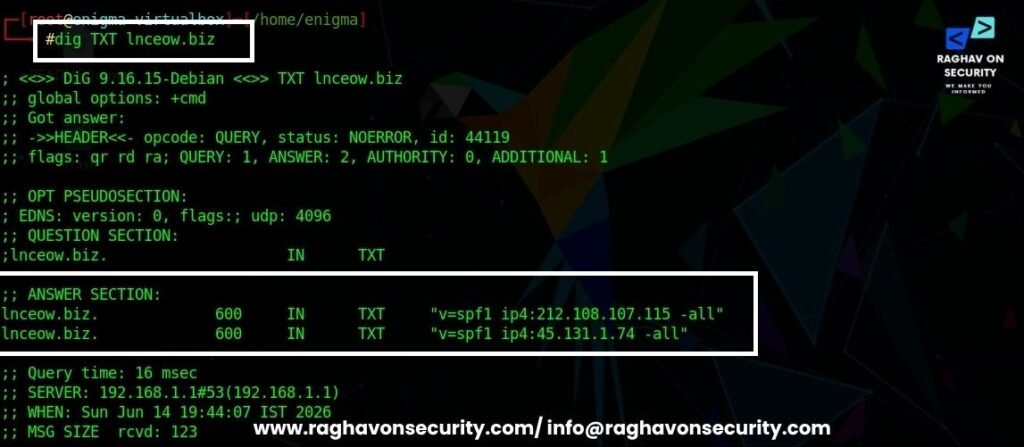
- After querying the lnceow.biz. We can see the two SPF records – v=spf1 ip4:212.108.107.115 -all, and v=spf1 ip4:212.108.107.115 -all.
- These two IP addresses are authorized to send the emails for – lnceow.biz
- If the only lnceow.biz is authorized to send emails, why do actual parameters show three different domains?
ta8132.mp2200.com (mta8132.mp2200.com)
vmta186.85.lstrk.net (vmta186.85.lstrk.net)
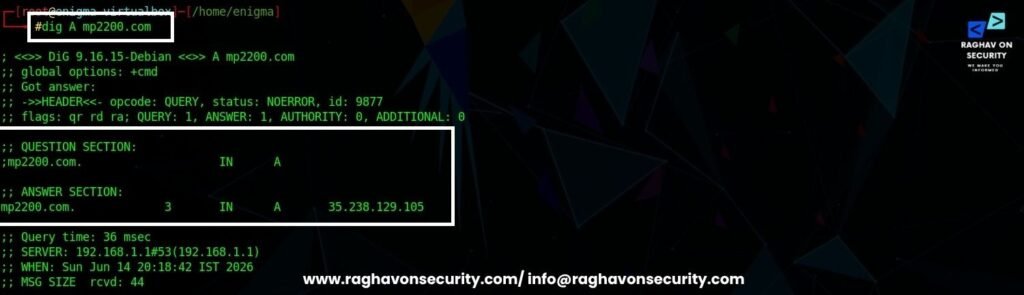
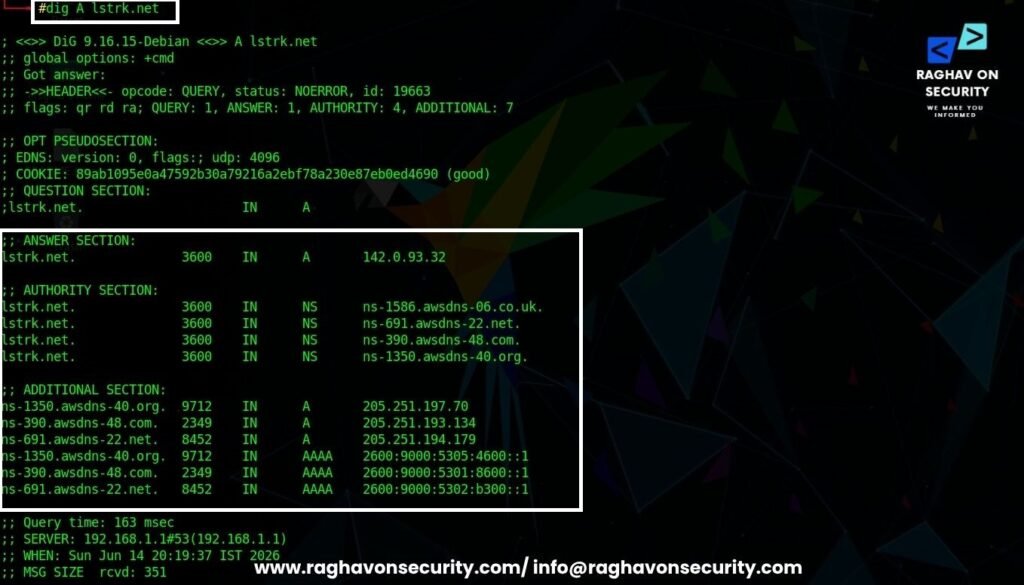
efianalytics.com (efianalytics.com)- Now we will query the above three domains with the help of dig too.
- Type dig A mp2200.com
- Type dig A lstrk.net
- Type dig A efianalytics.com
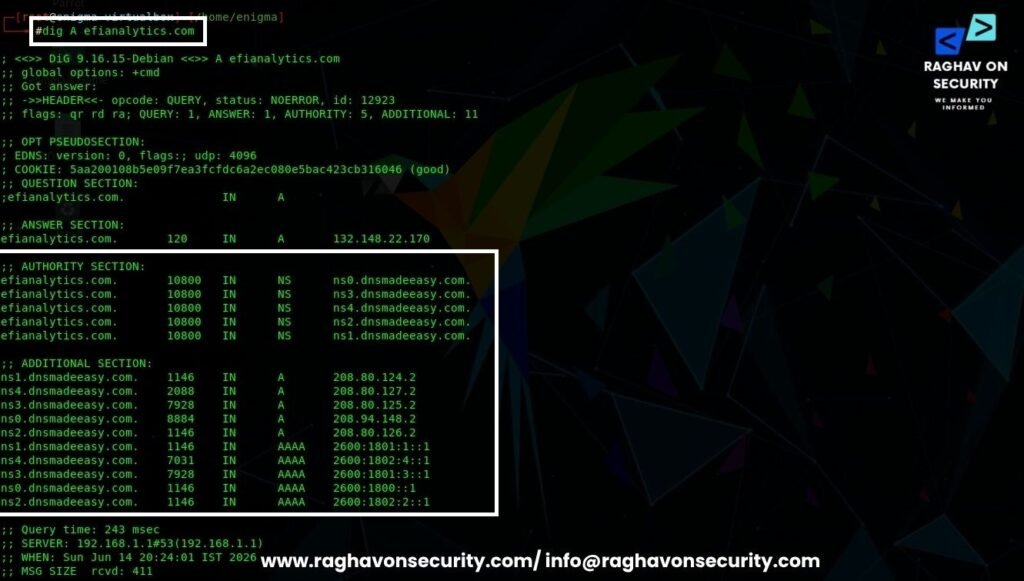
- After querying all the domains, it is clear that these domains’ IP addresses are completely different from lnceow.biz’s IP addresses.
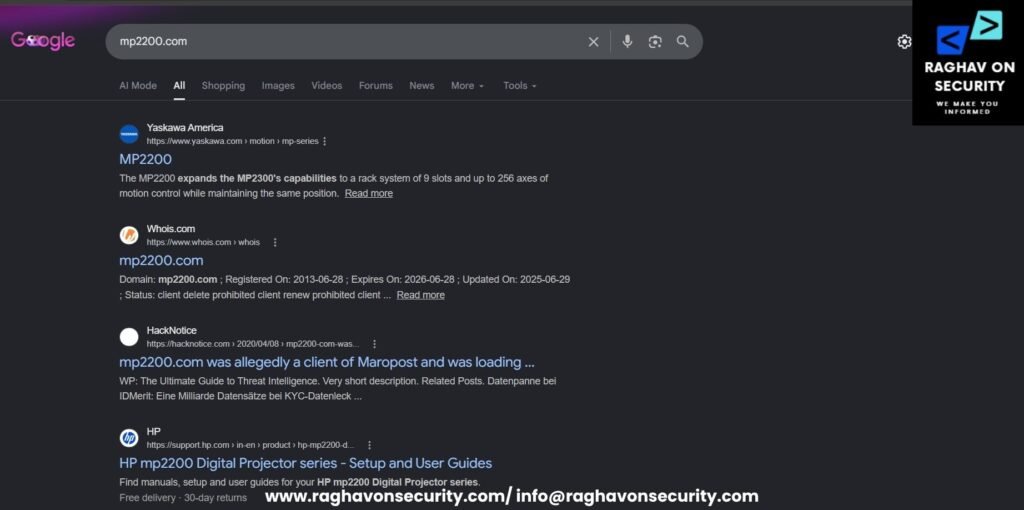
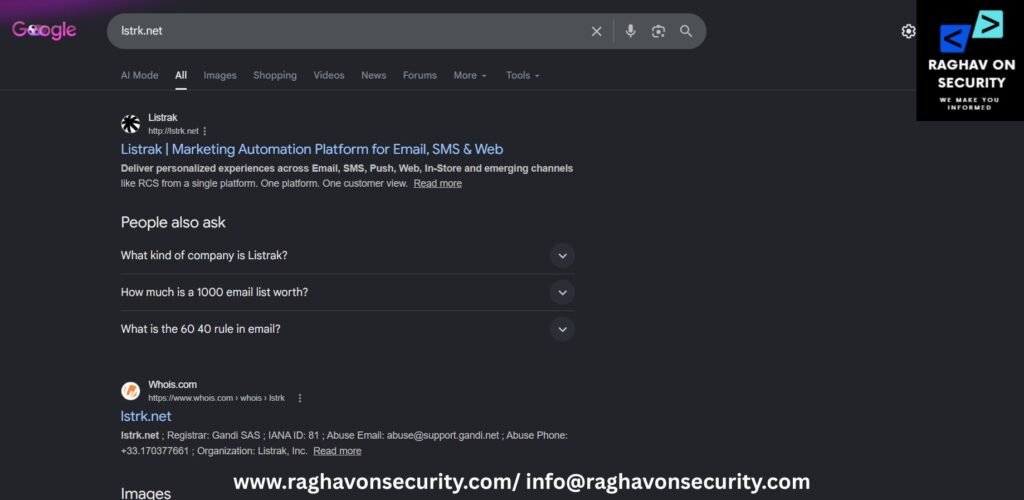
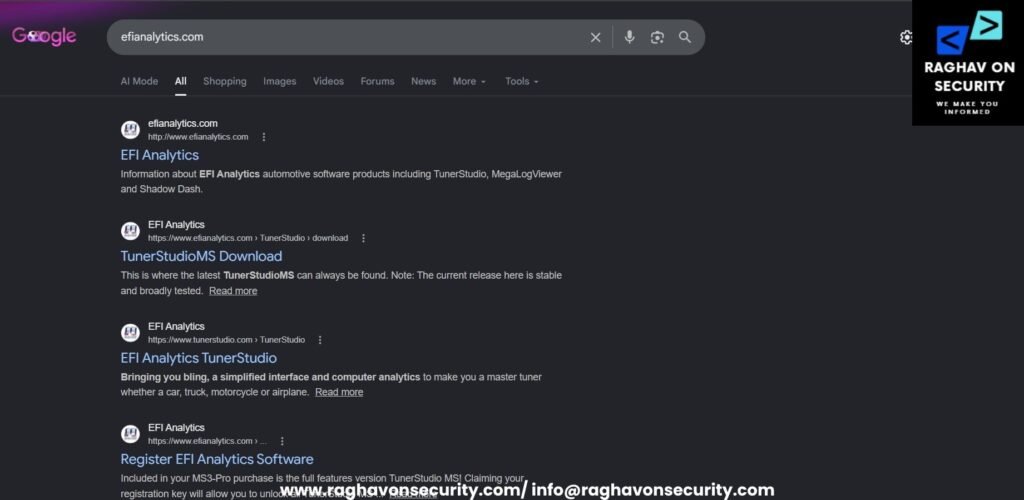
- After searching these domains on the search engine, it clearly shows that these are marketing platforms used for sending emails.
- mp2200.com
- lstrk.net
- efianalytics.com
- Most of these domains are marketing or some sort of utility tools from different industries.
Automating Email Header Analysis
Manual email header analysis provides valuable insights into the origin and authenticity of an email. However, the investigation process can become time-consuming when analysts need to review large volumes of email headers, phishing campaigns, spam messages, Business Email Compromise (BEC) attempts, or threat intelligence cases. Furthermore, investigators often need to examine multiple email header fields and correlate information from different sources.
During the investigation process, analysts trace mail transfer agents (MTAs), validate SPF, DKIM, and DMARC records, resolve IP addresses, inspect DNS records, and analyze infrastructure associated with the sending domain. In addition, they must verify authentication results and identify potential indicators of malicious activity. As a result, manual email analysis can require significant time and effort, especially during large-scale cybersecurity investigations. Consequently, many security teams use automated email analysis tools to accelerate investigations, improve accuracy, and streamline threat intelligence and phishing analysis workflows.
Cyber Forensics Email Tracer
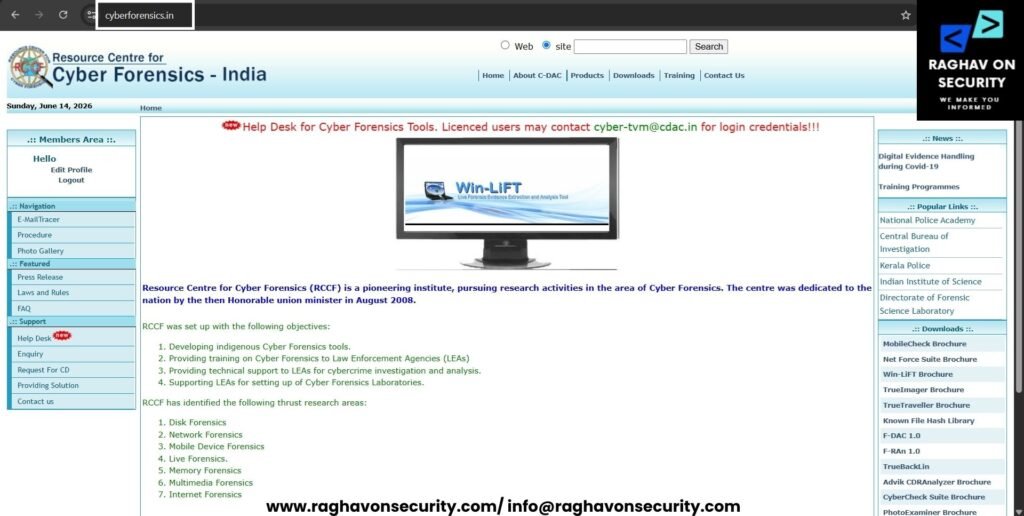
To simplify and accelerate this process, investigators can leverage the CyberForensics Email Tracer available at CyberForensics.in. The tool automates the extraction and analysis of critical email header information, helping security professionals, incident responders, and digital forensic investigators.
- Go to Cyber Forensics.
- Create your account.
- Log in with your credentials.
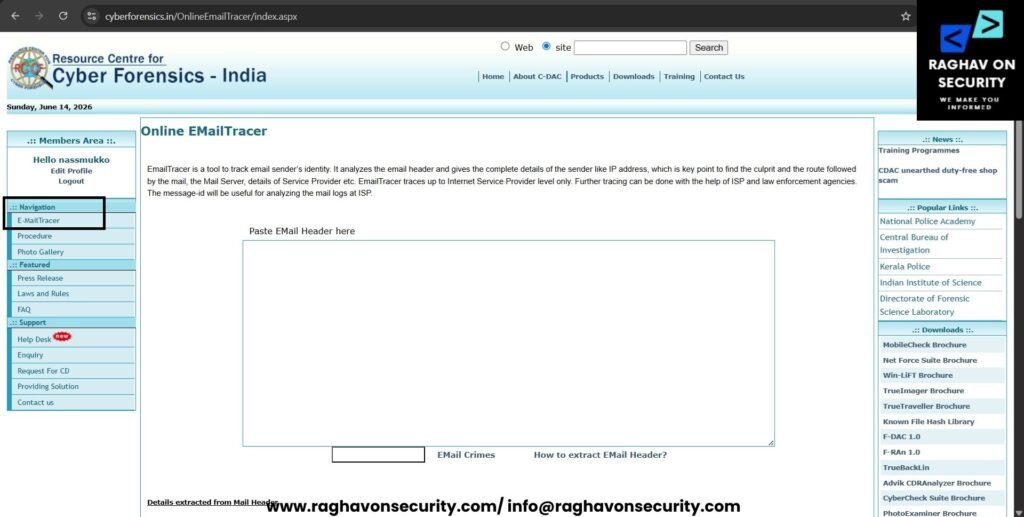
- Click on the Email Tracer listed under the Navigation. Paste the email header in the box “Paste Email Header here“.
- Originating IP addresses,
- SPF and DKIM authentication details,
- mail routing paths,
- relay servers,
- timestamps,
- other forensic
- This tool will extract sender information,
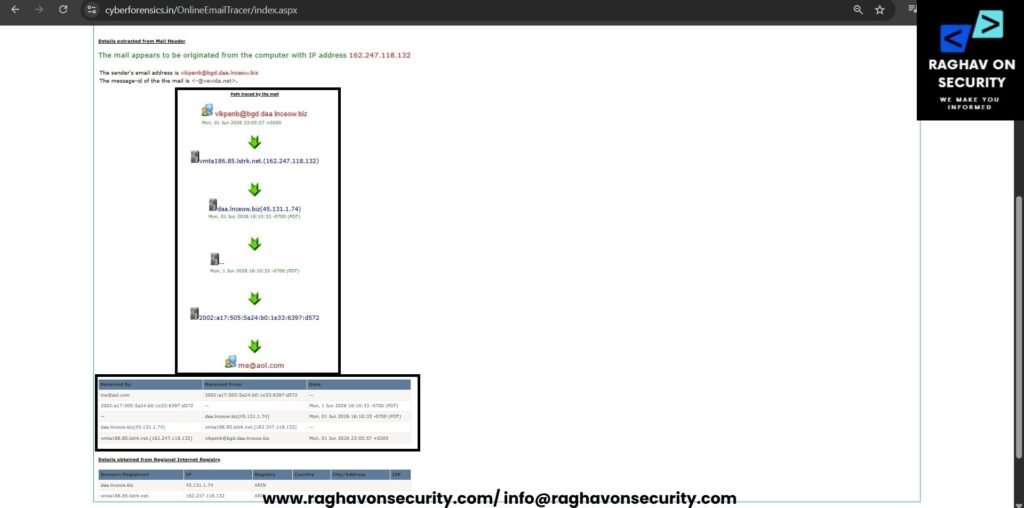
- The screenshot above demonstrates how the tool processes the analyzed email header and highlights the key forensic indicators required during an email reconnaissance or phishing investigation.
Conclusion
Based on the analysis of the email headers, DNS records, and mail transfer infrastructure, the email appears to have been delivered through a third-party email marketing platform rather than directly from the sender’s domain. During the investigation, we identified multiple mail transfer agents (MTAs) and email delivery servers, including domains commonly associated with bulk email distribution and marketing services. Furthermore, the DNS TXT records revealed email authentication mechanisms such as DKIM, which indicates that the domain owner has configured infrastructure to authorize and validate outbound email communications.
It is important to note that the mail server hostnames and IP addresses identified in the email headers differ from the sender’s domain infrastructure. However, this behavior is common in legitimate marketing campaigns, newsletters, and automated email communications. In most cases, organizations rely on external email service providers (ESPs) to manage large-scale email delivery. As a result, the presence of different mail server domains does not automatically indicate malicious activity.
Additionally, the SPF records identified authorized sending IP addresses for the domain, while the DKIM records confirmed that the domain had implemented email authentication controls. Throughout the investigation, the email routing path, DNS records, and associated infrastructure exhibited characteristics commonly found in commercial email delivery environments.
Overall, after reviewing the available DNS records, DKIM configuration, SPF records, mail routing information, and associated delivery infrastructure, the evidence suggests that this email was transmitted through a marketing or email delivery service acting on behalf of the sender’s domain. Although email authentication alone should not be considered definitive proof of legitimacy, the observed indicators align more closely with a professionally managed email marketing platform than with a typical phishing, spoofing, or malicious email campaign.
FAQs
What is email reconnaissance in cybersecurity?
Email reconnaissance is the process of collecting and analyzing information related to email addresses, email domains, mail servers, and email infrastructure. As a result, cybersecurity professionals use email reconnaissance to investigate suspicious emails, trace email origins, identify phishing attacks, detect email spoofing, and gather valuable threat intelligence. Furthermore, these techniques help investigators uncover malicious infrastructure and validate sender authenticity. In addition, organizations across India, the USA, UAE, and other regions rely on email reconnaissance to strengthen email security and improve threat detection capabilities.
How can email header analysis help identify phishing emails?
Email header analysis helps investigators examine routing paths, sender information, mail servers, authentication records, and message metadata. By analyzing SPF, DKIM, DMARC, and Received headers, security teams can verify sender authenticity, detect spoofed emails, and uncover phishing campaigns. Consequently, organizations can improve threat detection and incident response capabilities.
What are SPF, DKIM, and DMARC in email security?
SPF (Sender Policy Framework), DKIM (DomainKeys Identified Mail), and DMARC (Domain-based Message Authentication, Reporting, and Conformance) are email authentication mechanisms. These technologies help organizations prevent email spoofing, validate legitimate senders, and reduce phishing attacks. Furthermore, they play a critical role in protecting business communications and improving email deliverability.
Which tools are commonly used for email reconnaissance and OSINT investigations?
Security professionals frequently use tools such as theHarvester, Infoga, WHOIS lookups, DNS utilities, and email header analyzers during email reconnaissance investigations. In addition, automated solutions such as email tracing tools can simplify email header analysis, identify mail transfer agents (MTAs), and accelerate phishing investigations and digital forensic analysis.
How do investigators trace the origin of an email?
Investigators trace email origins by examining email headers, SMTP routing paths, originating IP addresses, DNS records, SPF policies, DKIM signatures, and domain reputation data. As a result, they can identify the infrastructure used to send the email and determine whether the message originated from a legitimate sender, marketing platform, or potentially malicious source.