

Table of Contents
What is Phishing? Understanding the Growing Cyber Threat in 2026
Phishing remains one of the most common and successful cyberattack techniques used by threat actors worldwide. According to multiple cybersecurity reports, phishing attacks continue to account for a significant percentage of initial access breaches, ransomware incidents, business email compromise (BEC) attacks, and credential theft campaigns. Organizations across financial services, healthcare, government agencies, technology companies, educational institutions, and critical infrastructure sectors continue to face increasingly sophisticated phishing attempts targeting employees and customers.
What is Phishing?
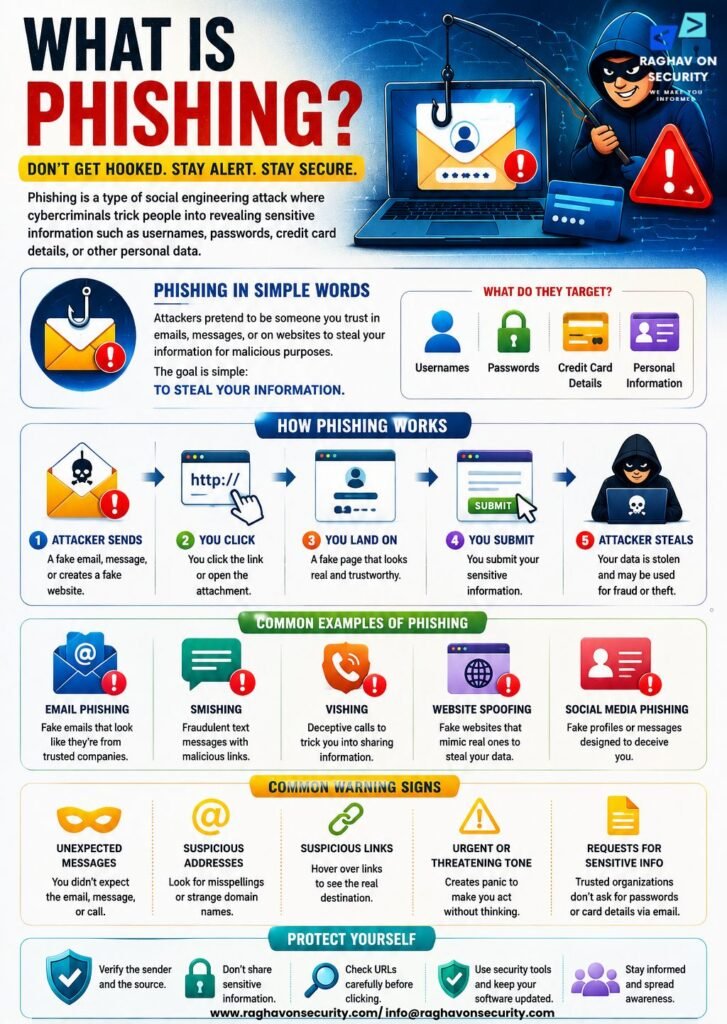
Phishing is a social engineering attack in which cybercriminals attempt to deceive individuals into revealing sensitive information, downloading malicious files, transferring funds, or granting unauthorized access to systems. Attackers typically impersonate trusted organizations, executives, vendors, financial institutions, cloud service providers, or government agencies to gain the victim’s trust.
These attacks are commonly delivered through emails, SMS messages (smishing), phone calls (vishing), social media platforms, collaboration tools, and malicious websites. The ultimate goal is usually credential theft, financial fraud, malware delivery, ransomware deployment, or unauthorized access to corporate networks.
Today, modern phishing campaigns often leverage artificial intelligence, domain spoofing, QR code phishing (quishing), and highly personalized spear-phishing techniques, thereby making detection increasingly difficult for both individuals and enterprises. As a result, organizations must combine user awareness with technical security controls to effectively defend against these evolving threats.
What are Phishing URLs?
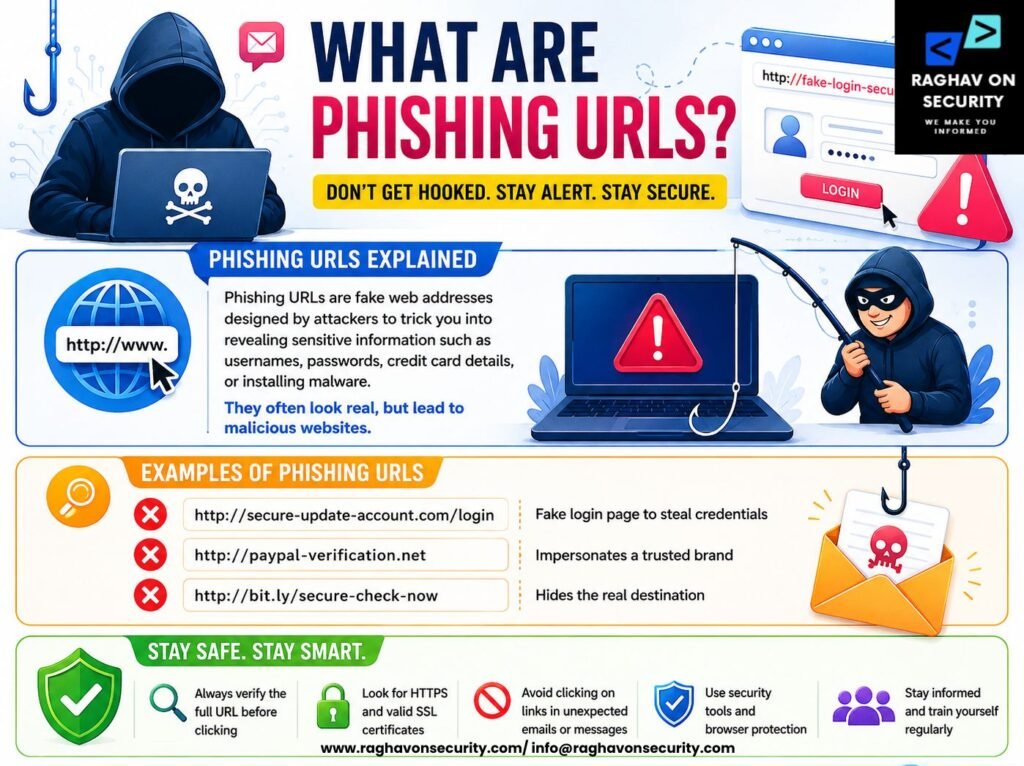
In simple terms, a phishing URL is a malicious web address specifically designed to trick users into believing they are visiting a legitimate website. Typically, attackers use these deceptive links to steal sensitive information, distribute malware, or redirect victims to fraudulent websites. These fraudulent URLs often imitate trusted brands, financial institutions, cloud platforms, government portals, e-commerce websites, and enterprise login pages.
Threat actors frequently register lookalike domains, typosquatted domains, homoglyph domains, or newly created domains that closely resemble legitimate websites. Once a victim clicks a phishing link, they may be redirected to fake login pages, malware-hosting websites, credential-harvesting portals, or fraudulent payment gateways.
Examples of phishing URL techniques include
- Typosquatting (paypaI.com vs paypal.com)
- Homograph attacks using Unicode characters
- Subdomain abuse
- URL shortener abuse
- Fake cloud document links
- QR-code embedded phishing URLs
- Brand impersonation domains
Why Phishing Links Remain a Major Cybersecurity Threat in 2026?
Despite significant advancements in email security gateways, threat intelligence platforms, and endpoint protection solutions, phishing links continue to remain one of the most effective attack vectors in 2026. Consequently, organizations must complement these security technologies with continuous user awareness and proactive threat detection strategies.
Several factors contribute to their continued success:
- AI-Powered Phishing Campaigns – Cybercriminals now use artificial intelligence to generate convincing phishing emails, fake websites, and highly personalized lures at scale.
- Credential Harvesting Attacks – Many phishing campaigns focus on stealing Microsoft 365, Google Workspace, VPN, and enterprise application credentials, providing attackers with direct access to corporate environments.
- Bypassing Traditional Security Controls – Modern phishing URLs often leverage legitimate cloud services, trusted file-sharing platforms, URL shorteners, and compromised websites to evade detection.
- Increase in Remote and Hybrid Workforces – Employees frequently access corporate resources from various devices and locations, increasing the attack surface available to threat actors.
- Brand Impersonation and Supply Chain Abuse – Attackers increasingly impersonate vendors, partners, executives, and well-known brands to increase the likelihood of user interaction.
- Financial and Data Breach Impact – A single successful phishing click can lead to ransomware infections, business email compromise incidents, account takeovers, regulatory penalties, operational disruption, and large-scale data breaches.
Why Do Security Teams Investigate Suspicious URLs?
Security teams investigate suspicious URLs because phishing links are often the first indicator of a broader cyberattack campaign. URL investigation helps analysts identify malicious infrastructure, uncover threat actor tactics, and prevent users from interacting with harmful websites.
The primary objectives of phishing URL investigations include:
- Detecting Malicious Domains – Analysts verify whether a domain has been associated with phishing campaigns, malware distribution, spam operations, or fraudulent activities.
- Identifying Credential Harvesting Sites – Security teams examine web pages for fake login portals designed to steal usernames, passwords, multifactor authentication codes, or session tokens.
- Analyzing Threat Infrastructure – Investigators review DNS records, hosting providers, SSL certificates, WHOIS information, IP addresses, and historical domain data to identify attacker-controlled infrastructure.
- Supporting Incident Response – URL investigations help incident response teams determine whether employees have interacted with malicious websites and assess the potential impact.
- Enhancing Threat Intelligence – Indicators of compromise (IOCs) discovered during URL analysis can be shared across security tools, security operations centers (SOCs), and threat intelligence platforms.
- Protecting Organizations from Future Attacks – Investigated URLs can be blocked through secure web gateways, DNS filtering solutions, email security platforms, and endpoint protection tools.
Why Investigating Phishing URLs Matters?
Phishing attacks continue to be one of the leading causes of cyber incidents worldwide. Recent cybersecurity reports indicate that more than 3.4 billion phishing emails are sent every day, while phishing remains one of the primary initial access vectors behind ransomware attacks, business email compromise (BEC), credential theft, and enterprise data breaches.
As cybercriminals increasingly leverage artificial intelligence, lookalike domains, QR code phishing, and sophisticated social engineering techniques, organizations across financial services, healthcare, government agencies, technology companies, retail, and critical infrastructure face an ever-growing risk from malicious URLs.
For security professionals, investigating phishing URLs is no longer just a reactive task—it is a proactive cybersecurity practice that helps identify threats before they compromise users, systems, and sensitive business data.
Protecting Users from Phishing Attacks
The primary objective of phishing URL investigation is to protect users from interacting with malicious websites designed to steal credentials, distribute malware, or commit financial fraud. Security teams analyze suspicious links before employees or customers access them, reducing the likelihood of successful cyberattacks.
Modern phishing websites often imitate trusted brands, cloud platforms, banking portals, government services, and enterprise applications with remarkable accuracy. By performing malicious URL analysis, domain reputation checks, website verification, and threat intelligence correlation, security analysts can quickly identify fraudulent websites and block access across the organization.
Proactively investigating phishing links also strengthens email security, web security, and cybersecurity awareness, helping organizations reduce human error and improve overall cyber resilience.
Preventing Account Compromise
Credential theft remains the primary objective of most phishing campaigns. Attackers frequently create convincing fake login pages that impersonate Microsoft 365, Google Workspace, VPN portals, cloud storage platforms, banking services, and enterprise applications to steal usernames, passwords, multifactor authentication (MFA) codes, and session cookies.
By investigating suspicious URLs before users interact with them, security teams can identify credential harvesting pages, detect lookalike domains, and prevent unauthorized access to corporate systems. This proactive approach significantly reduces the risk of account takeover (ATO), business email compromise (BEC), identity theft, and privilege escalation attacks.
Organizations that continuously monitor suspicious domains and phishing infrastructure are better equipped to protect employee accounts, customer identities, and critical business applications from cybercriminals.
Reducing Data Breaches
Many large-scale data breaches begin with a single phishing email containing a malicious URL. Once an attacker gains access to valid user credentials, they can move laterally across the network, steal sensitive information, deploy ransomware, or exfiltrate confidential customer data.
Investigating phishing URLs enables organizations to detect malicious infrastructure before attackers establish persistence within the environment. Security analysts use URL reputation services, WHOIS lookups, DNS analysis, SSL certificate inspection, sandbox analysis, and Indicators of Compromise (IOCs) to determine whether a suspicious link is associated with known phishing campaigns or malware operations.
Early detection helps organizations reduce the likelihood of costly data breaches, regulatory penalties, operational disruption, reputational damage, and financial losses while improving compliance with cybersecurity frameworks and industry regulations.
Supporting Incident Response
Phishing URL investigations play a critical role during cybersecurity incident response. When employees report suspicious emails or click unknown links, security teams must quickly determine whether the URL is malicious, assess the scope of exposure, and identify affected users or systems.
During an investigation, analysts examine domain registration details, DNS records, hosting infrastructure, SSL certificates, IP addresses, redirect chains, webpage content, and malware payloads. These findings help incident responders understand attacker tactics, identify additional Indicators of Compromise (IOCs), and implement effective containment and remediation measures.
URL investigations also enhance Security Operations Center (SOC) workflows by improving threat intelligence, enabling faster detection of emerging phishing campaigns, and strengthening defensive controls such as secure web gateways, DNS filtering, endpoint detection and response (EDR), and email security solutions.
By incorporating phishing URL analysis into incident response procedures, organizations can minimize dwell time, accelerate remediation, and improve their overall cybersecurity posture against evolving phishing threats.
Steps to Perform Visual Inspection of the URL
Security professionals always begin with a visual inspection of the URL. Many phishing links can be identified within seconds by looking for common indicators that attackers use to deceive users.
Check Spelling
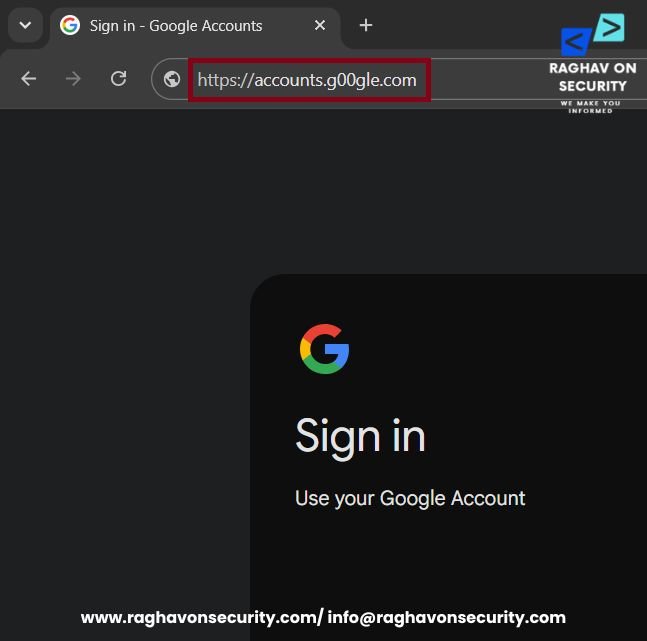
Carefully examine the domain name for spelling mistakes, missing letters, or character substitutions. Attackers often register look-alike domains such as accounts.g00gle.com or micros0ft.com to trick users into believing they are visiting a legitimate website.
Identify Suspicious Word
Look for unnecessary words such as secure, verify, login, update, account, or support combined with a well-known brand name. These terms are commonly used in phishing URLs to create a false sense of urgency or legitimacy.

Look for Brand Impersonation
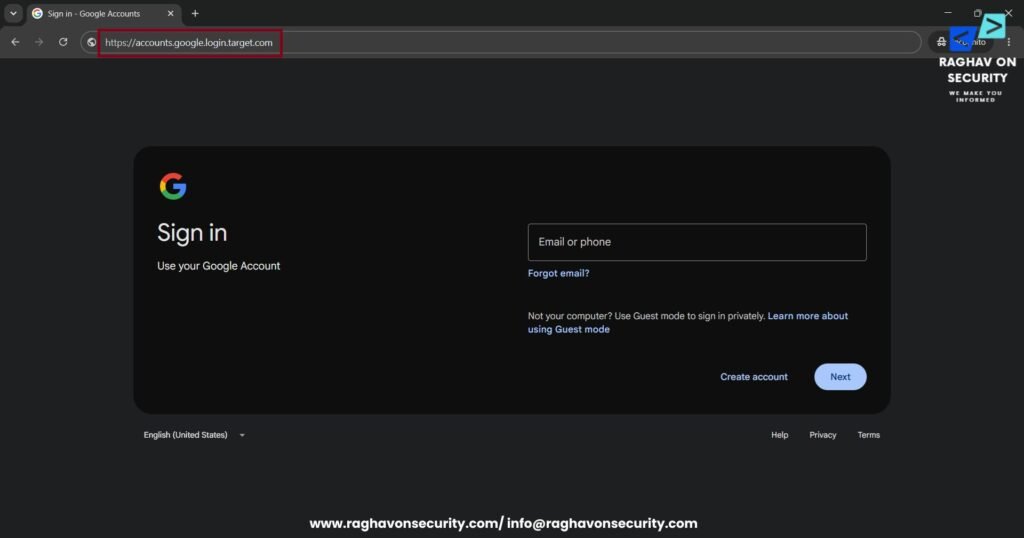
Verify that the brand name appears in the actual registered domain and not within a subdomain or directory. For example, account.google.login.target.com is controlled by target.com, not the legitimate Google domain.
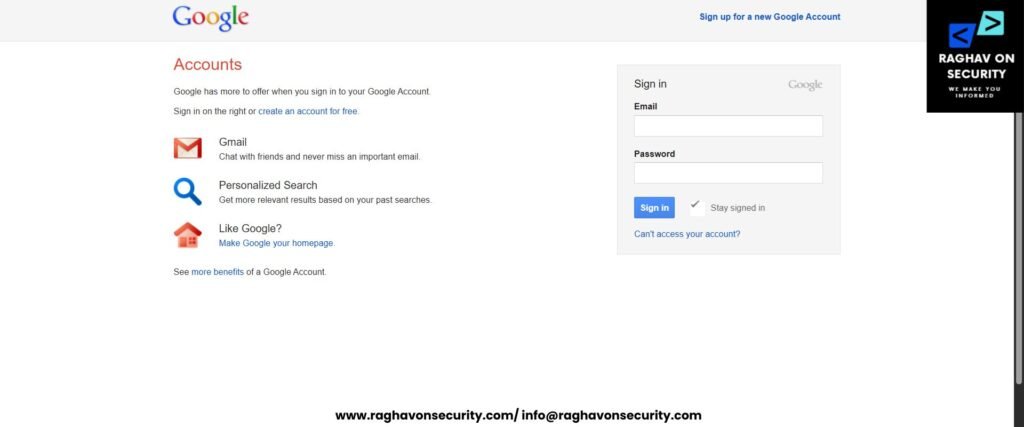
Be Cautious of Familiar or Outdated Login Interfaces
In addition, cybercriminals often create phishing websites that replicate older versions of popular login pages, such as Gmail, because long-time users may recognize and trust these familiar interfaces without noticing subtle differences. Meanwhile, legitimate services may occasionally display a different-looking sign-in page due to cached browser content, older browsers, embedded application webviews, or temporary loading behavior. Therefore, users should never rely solely on a website’s appearance and should always verify the domain name before entering their credentials.
Detect Homograph and Cyrillic Domain Attacks
One of the most overlooked yet dangerous techniques used in modern phishing campaigns is the homograph attack. It is also known as a Unicode spoofing attack or Cyrillic domain attack. Instead of relying on obvious spelling mistakes. Attackers register domains using Unicode characters from other alphabets that visually resemble standard English letters.
To the human eye, these fake domains appear identical to legitimate websites, making them highly effective for credential theft. It can be used in business email compromise (BEC) and malware delivery. Security professionals should always inspect suspicious URLs for Unicode abuse and Punycode encoding during phishing URL investigations.
Unicode Abuse
Unicode is an international character encoding standard that allows websites to use characters from hundreds of writing systems. It includes Latin, Cyrillic, Greek, Arabic, Chinese, Japanese, and many others. While this enables multilingual domain names, cybercriminals exploit Unicode to create homograph domains that closely resemble trusted websites.
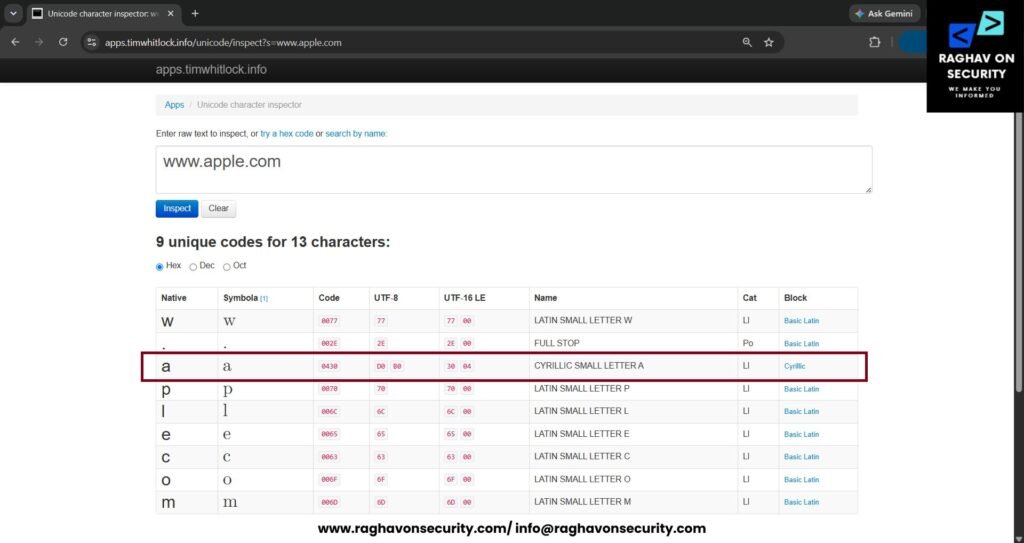
For example, attackers replace standard Latin letters with visually identical Cyrillic or Greek characters. Although the domain looks legitimate in a browser, it actually points to a completely different website controlled by the attacker.
Example
Legit Domain – https://www.apple.com
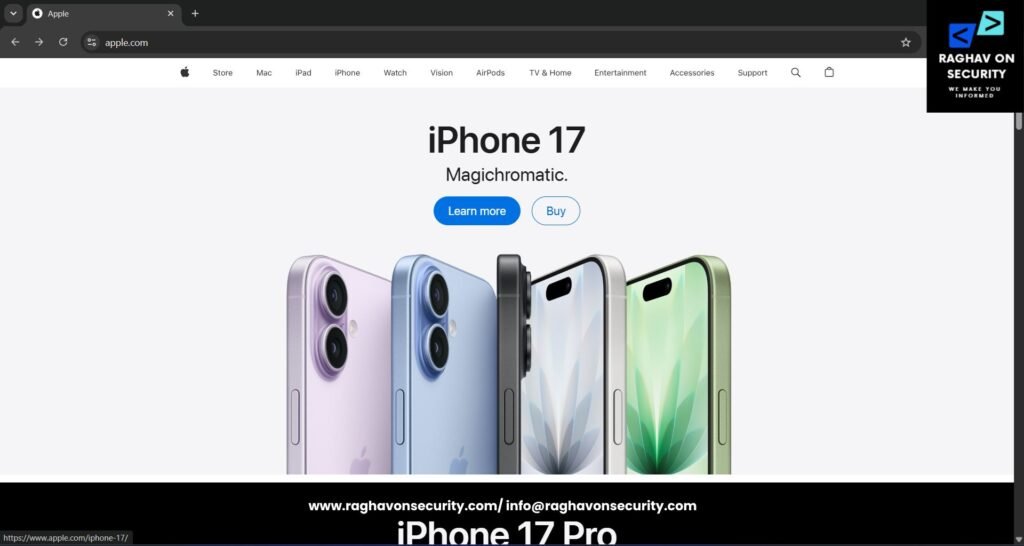
Fake Domain – https://www.аpple.com
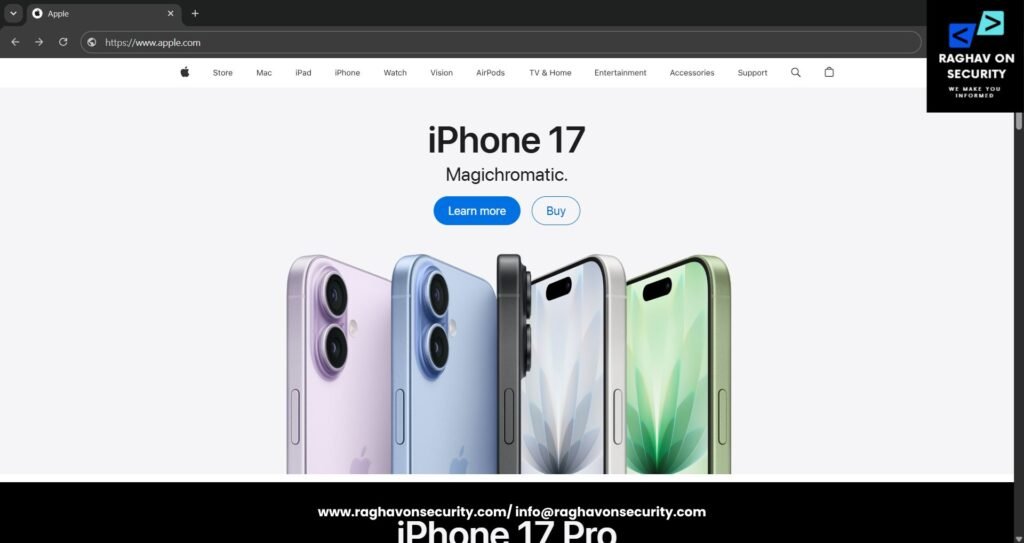
At first glance, both domains appear identical. However, the malicious version replaces several Latin letters with visually similar Cyrillic characters. Such substitutions are almost impossible to notice without close inspection. Unicode abuse has become a preferred technique for phishing campaigns targeting enterprise users. Majorly for financial institutions, cloud services, and online banking platforms.
Key Recommendations
When analyzing suspicious URLs:
- Copy the domain into a Unicode inspection tool.
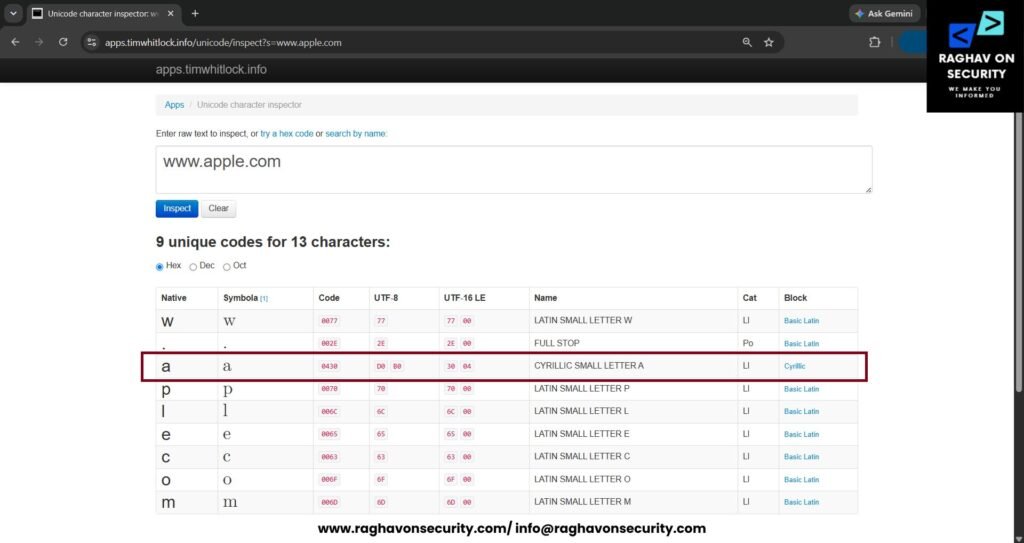
- Compare each character individually.
- Check whether multiple writing systems are being mixed.
Punycode
Since the Domain Name System (DNS) only supports ASCII characters. Every Unicode domain name is converted to a machine-readable format known as Punycode. Domains containing international characters begin with the prefix “xn--“.
If a user encounters a spoofed or fake domain, the “xn--“ prefix will appear when they click on the search bar. The appearance of “xn--“ within a URL should immediately prompt additional analysis.
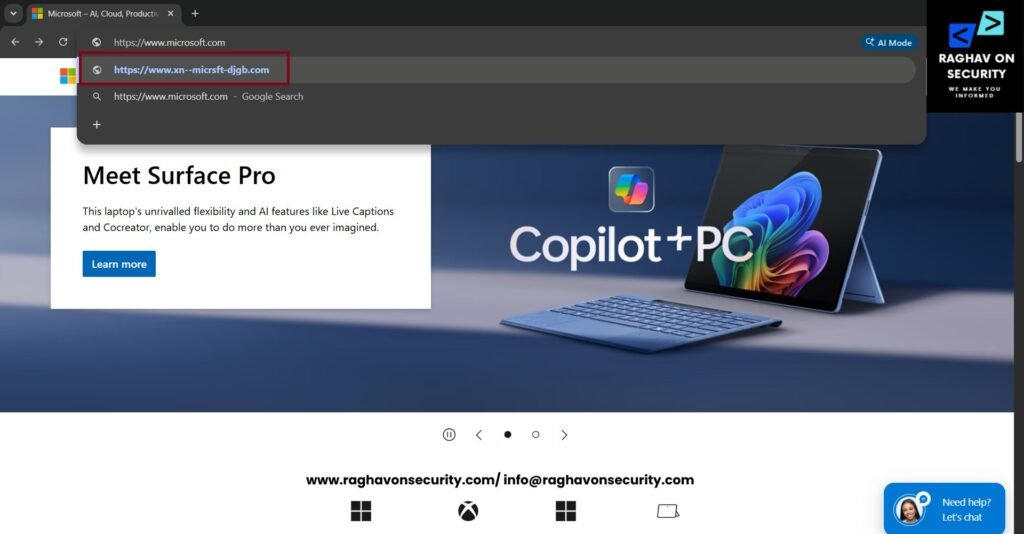
Attackers often register these encoded domains because browsers may automatically convert them back into their Unicode form. It makes them appear trustworthy to unsuspecting users.
Key Recommendations
Decode Punycode using online or offline tools. For demonstration, we will use DNS Checker – IDN Punycode Converter.
Important Note: Not Every xn-- Domain Is Malicious
The xn-- prefix indicates that the domain is using Punycode. An ASCII-compatible encoding that allows the Domain Name System (DNS) to support international characters. Many legitimate organizations, businesses, and government services use Internationalized Domain Names (IDNs). Users can access websites in their native languages.
For example, organizations serving Arabic-, Chinese-, Hindi-, Japanese-, Korean-, or other non-Latin-speaking users may legitimately use Unicode domain names. In such cases, when processed by the DNS, these domains are automatically converted into their Punycode (xn--) representation, allowing them to function correctly within the Domain Name System while preserving their native-language appearance.
Therefore, security analysts should treat an xn-- domain as a signal for additional verification—not immediate evidence of phishing.
xn-- Domain Deserves Further Investigation
A Punycode domain should receive closer scrutiny if it:
- Impersonates a well-known brand or organization.
- Decodes into a domain that visually resembles a trusted Latin-character domain.
- Uses mixed writing systems (for example, Latin combined with Cyrillic or Greek characters).
- Was registered very recently.
- Redirects users to a credential harvesting page.
- Has poor domain reputation or has been reported by threat intelligence feeds.
- Contains suspicious redirects or requests sensitive information.
ASCII domains can be just as dangerous as Unicode domains
ASCII Phishing Domains Can Contain Any Additional Word
Unlike homograph attacks, ASCII phishing domains use only standard English (ASCII) characters. They do not rely on Unicode or Punycode. Instead, attackers register domains that combine a trusted brand name with additional words to make the URL appear legitimate.
There is no fixed naming convention. Cybercriminals can combine a brand name with virtually any word. It relates to authentication, payments, support, verification, customer services, security, cloud platforms, or account management.
For example, a phishing domain may follow patterns such as:
- Brand + Login
- Brand + Secure
- Brand + Verify
- Brand + Account
- Brand + Support
- Brand + Update
- Brand + Portal
- Brand + Cloud
- Brand + Service
- Brand + Authentication
Similarly, attackers may place the brand name anywhere within the domain:
- Brand + Keyword
- Keyword + Brand
- Brand + Keyword + Number
- Brand + Keyword + Region
- Keyword + Brand + Secure
- Brand + Random Characters
Domain Verification
One of the most effective ways to investigate a suspicious URL is by examining its domain registration details. While a phishing website may closely resemble a legitimate organization, its registration records often reveal valuable indicators about the domain’s legitimacy.
In practice, security analysts, SOC teams, incident responders, and threat hunters routinely perform WHOIS analysis, review domain age, inspect registrar information, and identify suspicious registration patterns to determine whether a domain is part of an ongoing phishing campaign.
However, modern privacy regulations and registrar privacy services may limit the availability of some WHOIS information. Nevertheless, domain registration analysis remains an essential step in phishing URL investigations and cyber threat intelligence.
WHOIS Analysis
WHOIS is a protocol and database that provides registration information about a domain name. During a phishing investigation, first review the WHOIS records to gather key information about the suspicious domain. Specifically, WHOIS records can help you identify when the domain was registered, which registrar manages it, the domain’s expiration date, its authoritative name servers, registration status, and, when available, the registrant’s contact details.
While many legitimate organizations use privacy protection services to hide personal information, WHOIS data still provides valuable context for investigators. Comparing WHOIS records with known legitimate domains can reveal inconsistencies that may indicate brand impersonation or malicious infrastructure.
Domain Checklist
- Domain creation date
- Last updated date
- Expiration date
- Domain registrar
- Name servers
- Registration status
- DNSSEC status
- WHOIS privacy protection
- Registrant organization (when available)
- Administrative and technical contacts (if public)
Domain Analysation
- For demonstration of the domain analysis. We will be using Whois Domain Analysis.
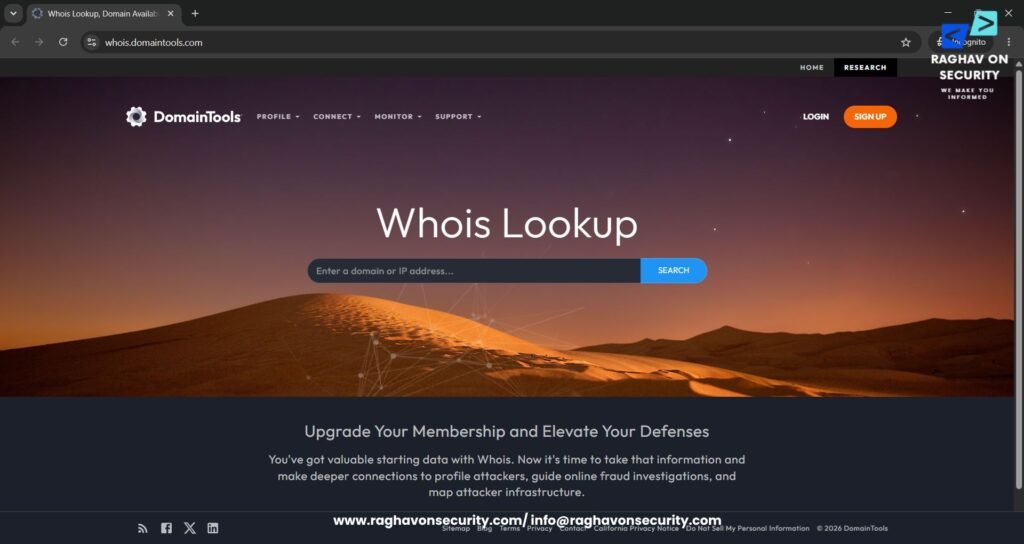
- For testing, we will be showcasing vulnweb.com
- In the search bar, type “vulnweb.com” or the targeted domain.
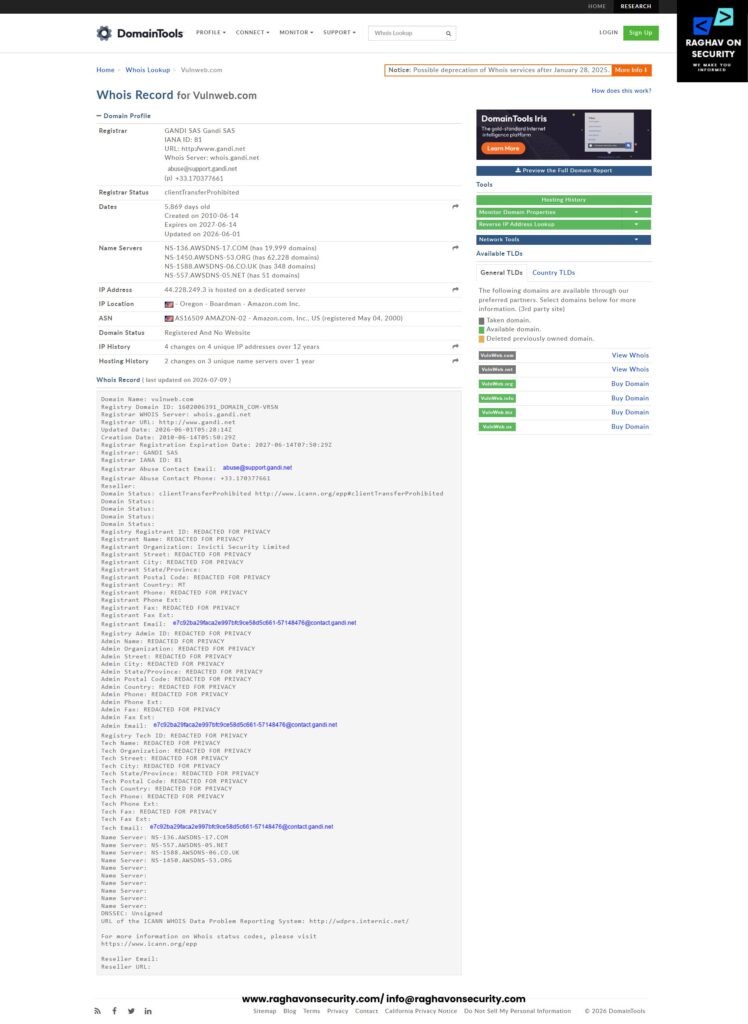
- As shown in the above screenshot, it shows the detailed information on vulnweb.com. These findings do not automatically prove malicious intent,
- Top risk factors to evaluate: if the following match, we need to further investigate.
- Domain registered only a few days ago.
- Registrar different from popular official registrar.WHOIS privacy enabled.
- Generic name servers unrelated to any popular domain name.One-year registration period.
Key Recommendations
- Never evaluate a suspicious domain in isolation.
- Correlate WHOIS records, DNS data, Certificate Transparency logs, passive DNS history, IP addresses, and hosting infrastructure.
- Use threat intelligence feeds to uncover related malicious domains and identify broader phishing campaigns.
Analyse DNS Records
Analyzing DNS (Domain Name System) records is a fundamental step in any phishing URL investigation. DNS records reveal how a domain is configured, where it is hosted, which mail servers it uses, and who manages its DNS infrastructure. During a cybersecurity investigation, DNS analysis helps SOC analysts, threat hunters, digital forensics investigators, and incident responders identify suspicious infrastructure that may indicate phishing, malware delivery, credential harvesting, or business email compromise (BEC).
It is important to remember that a single DNS record does not determine whether a domain is malicious. Instead, investigators analyze multiple DNS records together and correlate them with WHOIS data, SSL certificates, passive DNS history, Certificate Transparency logs, website behavior, and cyber threat intelligence.
A Record
An A Record maps a domain name to its IPv4 address. It identifies the web server hosting the website and allows investigators to determine where the domain resolves.
During a phishing investigation, analysts examine the A Record to understand the hosting infrastructure behind a suspicious domain and identify connections with other potentially malicious websites.
For example, we will use NSLookup. Open NSLookup in the Windows Command Prompt.
- Type
nslookup

set type=a
hackthissite.org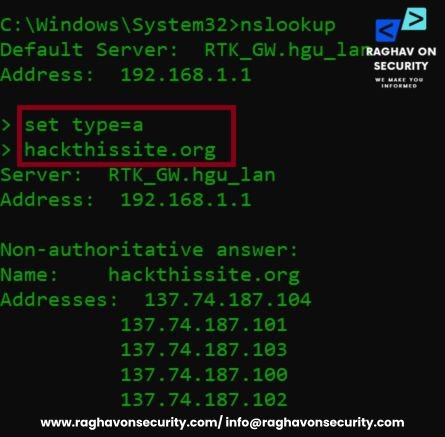
What a Suspicious A Record May Indicate?
MX Records identify the mail servers responsible for receiving email for a domain. They play an important role when investigating phishing emails, business email compromise (BEC), and email spoofing campaigns.
- The IP address hosts dozens or hundreds of suspicious domains.
- Multiple phishing domains resolve to the same IPv4 address.
- The IP address has previously appeared in malware or phishing threat intelligence feeds.
- The hosting location is inconsistent with the organization the domain claims to represent.
- The A Record changes frequently (Fast Flux DNS), making infrastructure tracking difficult.
- The server has a poor reputation based on IP intelligence platforms.
- Reverse IP lookups reveal numerous lookalike or recently registered domains.
MX Records
Attackers frequently configure email services on phishing domains to distribute fraudulent emails or receive responses from victims.
- Type
nslookup

set type=mx
hackthissite.org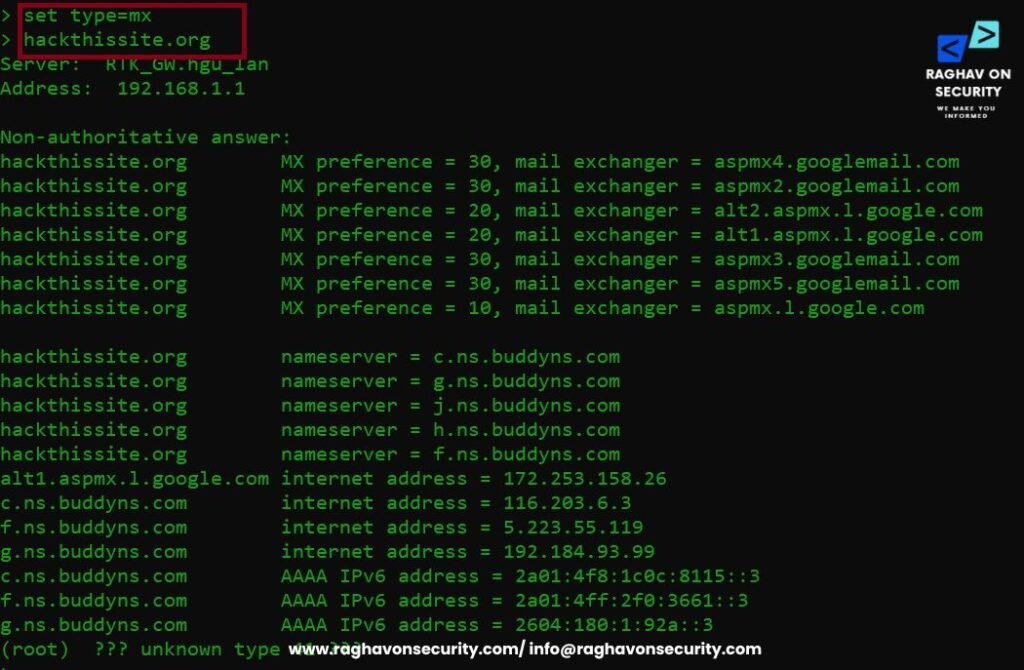
What a Suspicious MX Record May Indicate
- Recently configured mail servers.
- Mail servers inconsistent with the organization being impersonated.
- Disposable or low-reputation email hosting providers.
- Missing email authentication mechanisms (SPF, DKIM, DMARC).
- Email infrastructure that differs significantly from the legitimate organization’s configuration.
- Multiple phishing domains sharing the same mail server.
TXT Records
TXT Records store text-based DNS information and are commonly used for email authentication and domain verification. They often contain SPF, DKIM, and DMARC policies that help prevent email spoofing.
Although missing TXT records do not automatically indicate malicious activity, attackers often neglect proper email authentication when creating phishing domains. Therefore, investigators should treat missing or misconfigured TXT records as one indicator among many rather than as definitive evidence of a phishing website.
- Type
nslookup

set type=txt
hackthissite.org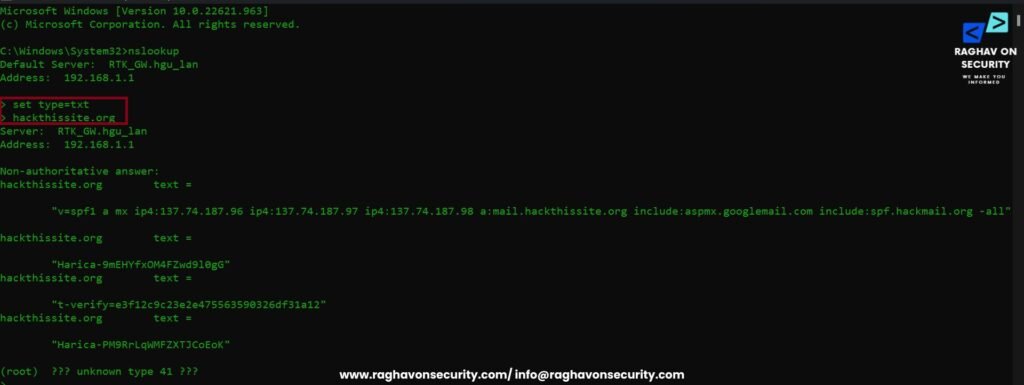
What a Suspicious TXT Record May Indicate
- Missing SPF record.
- Missing DKIM configuration.
- Missing DMARC policy.
- Weak SPF policies that authorize excessive mail servers.
- Recently added verification records with little supporting infrastructure.
- TXT entries inconsistent with the organization’s normal email configuration.
- Misconfigured email authentication that could enable spoofing.
NS Records
Nameservers determine which DNS servers are authoritative for a domain. They reveal who manages the domain’s DNS infrastructure and can help investigators identify relationships between multiple suspicious domains.
Threat actors often reuse the same DNS infrastructure across numerous phishing campaigns.
- Type
set type=ns
hackthissite.org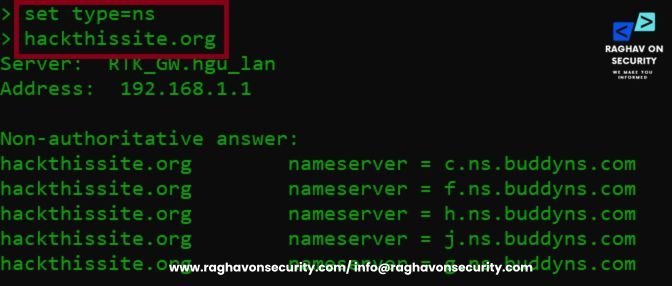
What Suspicious Nameservers May Indicate
- Multiple suspicious domains using identical nameservers.
- Recently created DNS infrastructure.
- Frequent nameserver changes.
- Infrastructure previously associated with phishing campaigns.
- Shared DNS providers among numerous lookalike domains.
- Nameservers linked to recently registered phishing domains.
- DNS configurations commonly observed in malicious infrastructure.
Investigate the URL Using Threat Intelligence Sources
Reputation analysis is the process of evaluating whether a URL, domain, or IP address has been previously identified as malicious, suspicious, or trustworthy using cyber threat intelligence platforms and URL reputation databases. Security analysts use reputation analysis to quickly determine whether a phishing URL has been associated with credential harvesting, malware distribution, spam campaigns, command-and-control (C2) infrastructure, or other cyber threats.
A poor reputation score alone should not be treated as conclusive evidence of malicious activity. Instead, investigators should correlate reputation data with WHOIS records, DNS analysis, SSL/TLS certificates, website behavior, and other threat intelligence indicators to accurately assess the risk posed by a suspicious URL.
Threat Intelligence Tools….1
VirusTotal
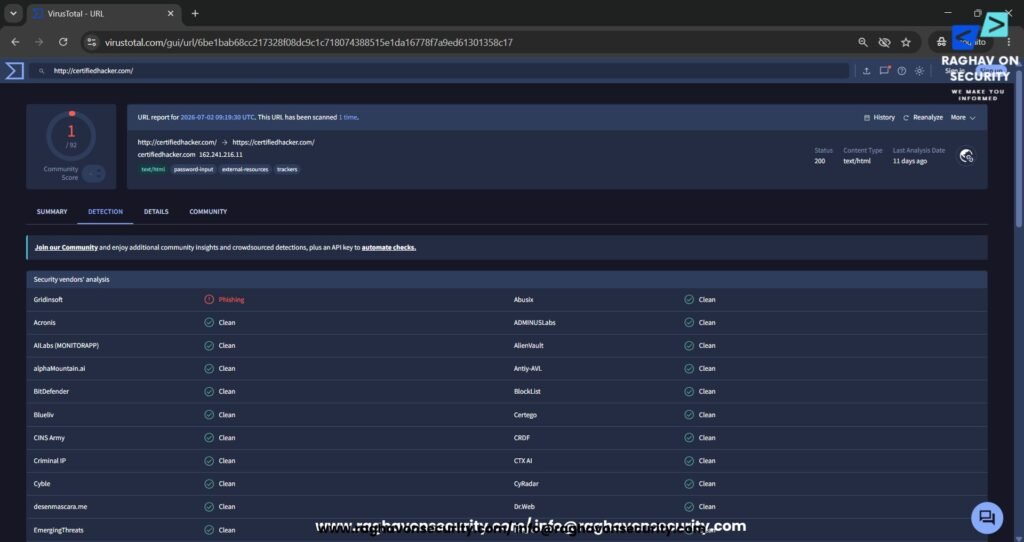
- VirusTotal is one of the most widely used threat intelligence platforms for analyzing suspicious URLs, domains, IP addresses, and file hashes. During a phishing URL investigation, VirusTotal aggregates detection results from dozens of antivirus engines and security vendors to determine whether a URL has been associated with phishing, malware, ransomware, spam, or other cyber threats.
- Investigators can review community comments, DNS resolutions, SSL certificate details, passive DNS information, and relationships between domains, making VirusTotal an essential resource for malicious URL analysis, domain reputation analysis, incident response, and threat hunting.
URLscan.io
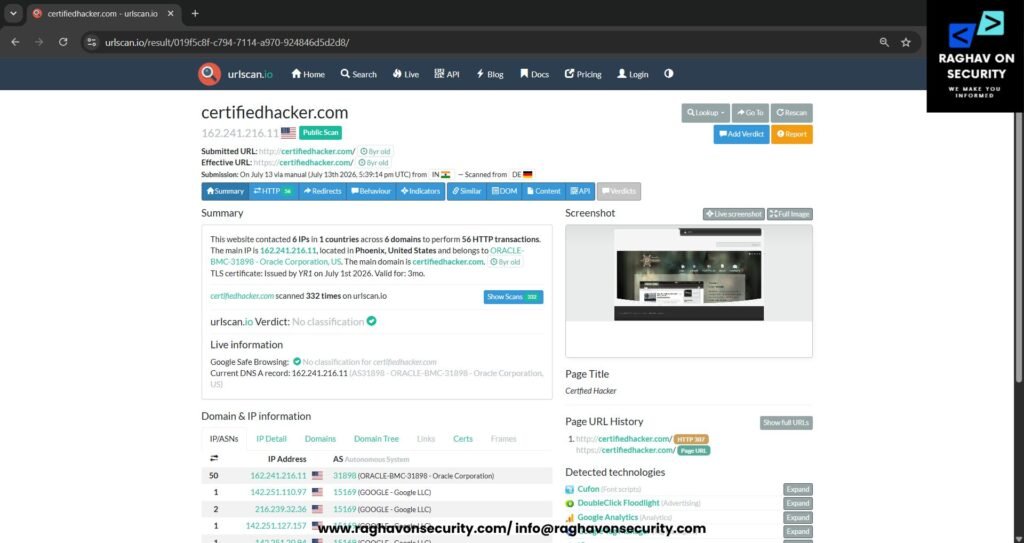
- URLscan.io is a web-based analysis platform that safely visits a URL in an isolated environment and records its behavior without requiring investigators to access the website directly. It captures screenshots of the webpage, analyzes redirects, identifies JavaScript files, network requests, HTTP headers, cookies, third-party resources, and technologies used by the website.
- Security analysts use URLscan.io to detect fake login pages, credential-harvesting websites, malicious redirects, and suspicious web infrastructure during phishing investigations and digital forensics, making it a valuable tool for identifying phishing indicators before users interact with potentially harmful websites.
Threat Intelligence Tools….2
crt.sh
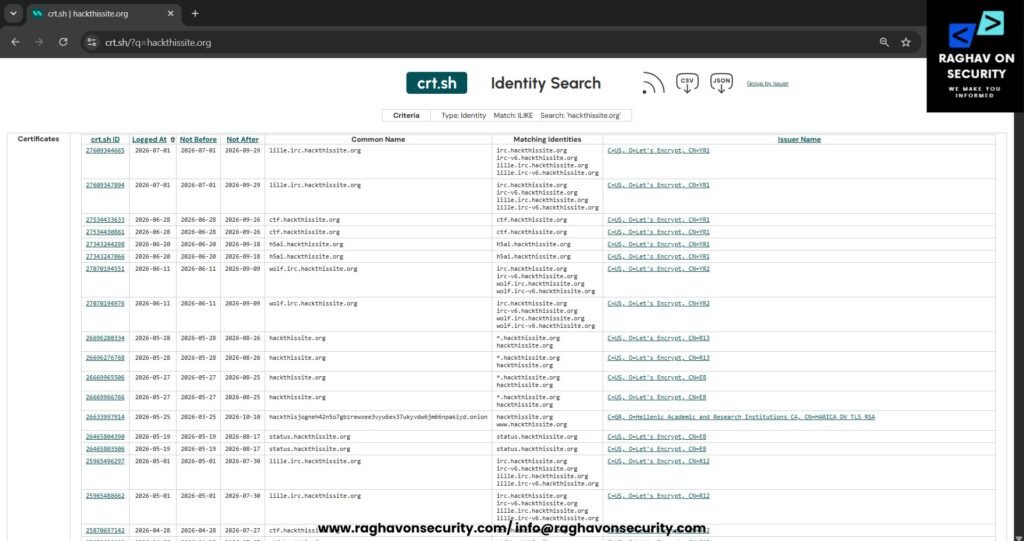
- crt.sh is a free Certificate Transparency (CT) search engine that allows investigators to examine publicly issued SSL/TLS certificates for a domain. During a phishing domain investigation, crt.sh helps identify subdomains, recently issued certificates, certificate reuse, wildcard certificates, and related infrastructure that may not be visible through standard DNS queries.
- By reviewing Certificate Transparency logs, security professionals can uncover additional assets associated with a suspicious domain, correlate phishing infrastructure, and detect brand impersonation campaigns, making crt.sh an important resource for SSL certificate analysis, threat intelligence, and infrastructure correlation.
AbuseIPDB
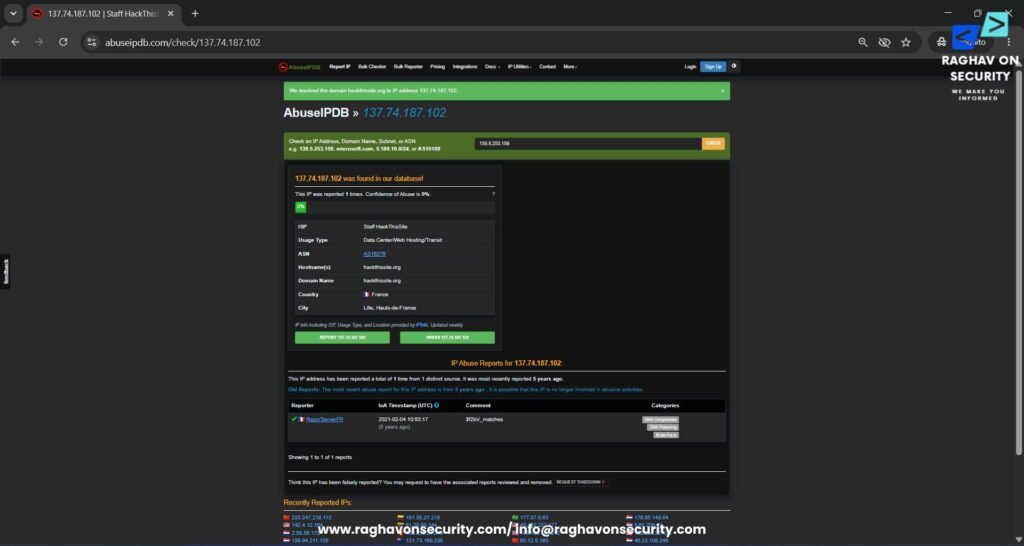
- AbuseIPDB helps security professionals investigate the reputation of an IP address by collecting community-reported abuse data. Investigators can use the platform to determine whether an IP address hosts phishing websites, distributes malware, launches brute-force attacks, sends spam, participates in botnet activity, or engages in other malicious activities.
- During a phishing URL investigation, analysts verify whether the IP address hosting a suspicious domain has a history of abuse, review community reports, and assess the confidence score before correlating the findings with DNS records, WHOIS information, SSL certificates, and other threat intelligence sources. AbuseIPDB is particularly useful for IP reputation analysis, malicious infrastructure investigation, and incident response.
Conclusion
Phishing attacks continue to evolve, making phishing URL investigation an essential skill for cybersecurity professionals, SOC analysts, incident responders, digital forensics investigators, threat hunters, IT administrators, and security-conscious users. A single suspicious URL can lead to credential theft, malware infections, ransomware deployment, business email compromise (BEC), financial fraud, and large-scale data breaches.
Ultimately, by following a structured investigation methodology—including URL structure analysis, WHOIS verification, DNS record analysis, homograph detection, SSL/TLS certificate inspection, domain reputation analysis, passive DNS investigation, Certificate Transparency log analysis, and threat intelligence correlation—investigators can accurately determine whether a URL is legitimate or part of a phishing campaign. As a result, this systematic approach improves detection accuracy, strengthens threat intelligence, and enables security teams to respond more effectively to phishing threats.
Leveraging trusted platforms such as VirusTotal, URLscan.io, crt.sh, AbuseIPDB, SecurityTrails, Cisco Talos, Shodan, Censys, and other cyber threat intelligence sources significantly improve the accuracy of phishing detection while reducing the likelihood of false positives. The investigation techniques discussed throughout this guide provide a practical framework that can be applied by anyone analyzing suspicious URLs, from individual users and security enthusiasts to enterprise security teams and digital forensics professionals.
In real-world incident response and cyber threat intelligence operations, forensic investigators typically begin URL investigations by validating the domain, examining DNS records, reviewing registration details, checking infrastructure reputation, and correlating findings across multiple intelligence sources before concluding.
No single indicator should be used to classify a URL as malicious; instead, investigators should combine multiple evidence-based findings to build a complete risk assessment. Adopting this systematic approach strengthens phishing detection capabilities, enhances cyber resilience, supports faster incident response, and enables organizations to proactively defend against emerging cyber threats in an increasingly sophisticated threat landscape.
(A) FAQs
What is a phishing URL, and how can I identify one?
A phishing URL is a malicious web address designed to impersonate a legitimate website and steal sensitive information such as usernames, passwords, or financial data. You can identify suspicious URLs by checking the domain name, WHOIS information, DNS records, SSL certificates, and URL reputation analysis using trusted cyber threat intelligence platforms.
Which tools are best for investigating a suspicious URL?
Popular phishing investigation tools include VirusTotal, URLscan.io, crt.sh, AbuseIPDB, SecurityTrails, Cisco Talos, Shodan, and Censys. These platforms help perform malicious URL analysis, domain reputation checks, SSL certificate inspection, passive DNS analysis, and infrastructure correlation.
Can a URL with HTTPS still be a phishing website?
Yes. An HTTPS connection only encrypts communication between the browser and the website; it does not verify that the website is trustworthy. Always combine SSL certificate analysis, domain verification, and phishing URL investigation with threat intelligence before trusting a website.
(B) FAQs
Is a recently registered domain always malicious?
No. A newly registered domain is not automatically malicious, but attackers frequently use recently created domains in phishing campaigns and malware distribution. Verify the domain age, WHOIS records, DNS configuration, and domain reputation analysis before making a security decision.
Why should I analyze DNS records during a phishing investigation?
Analyzing A, MX, TXT, and Nameserver (NS) records helps identify suspicious hosting infrastructure, email configurations, and DNS anomalies. DNS analysis, combined with cyber threat intelligence and passive DNS, improves the accuracy of malicious URL detection and incident response.
What is the most effective way to analyze a suspicious URL?
The most effective approach is to combine WHOIS analysis, DNS record inspection, URL reputation analysis, SSL certificate verification, passive DNS, Certificate Transparency logs, and sandbox testing. Using multiple threat intelligence tools provides a comprehensive phishing URL investigation and reduces false positives.